RNA Sequencing (Light) Pipeline

Version 6.1.0

New Try GenPipes Wizard

Command
user@machine:~$ genpipes rnaseq_light [options] [--genpipes_file GENPIPES_FILE.sh]
user@machine:~$ bash GENPIPES_FILE.sh
Options
-d DESIGN, --design DESIGN

                              design file
-r READSETS, --readsets READSETS

                      readset file
-h                        show this help message and exit
--help                    show detailed description of pipeline and steps
-c CONFIG [CONFIG ...],
--config CONFIG [CONFIG ...]

                        config INI-style list of files; config parameters
                        are overwritten based on files order
-s STEPS, --steps STEPS   step range e.g. '1-5', '3,6,7', '2,4-8'
-o OUTPUT_DIR, --output-dir OUTPUT_DIR

                        output directory (default: current)
-j {pbs,batch,daemon,slurm},
--job-scheduler {pbs,batch,daemon,slurm}

                        job scheduler type (default: slurm)
-f, --force               force creation of jobs even if up to date (default:
                          false)

                          Take the mem input in the ini file and force to have a
                          minimum of mem_per_cpu by correcting the number of cpu
                          (default: None)
--force_mem_per_cpu       FORCE_MEM_PER_CPU

                          Take the mem input in the ini file and force to have a
                          minimum of mem_per_cpu by correcting the number of cpu
                          (default: None)
--json-pt                 create JSON file for project_tracking database
                          ingestion (default: false i.e. JSON file will NOT be
                          created)
- -report                   create 'pandoc' command to merge all job markdown
                            report files in the given step range into HTML, if
                            they exist; if --report is set, --job-scheduler,
                            --force, --clean options and job up-to-date status
                            are ignored (default: false)
--clean                   create 'rm' commands for all job removable files in
                          the given step range, if they exist; if --clean is
                          set, --job-scheduler, --force options and job up-to-
                          date status are ignored (default: false)

                          Note: Do not use -g option with --clean, use '>' to redirect
                          the output of the --clean command option
-l {debug,info,warning,error,critical},
--log {debug,info,warning,error,critical}

                        log level (default: info)
--sanity-check            run the pipeline in `sanity check mode` to verify
                          all the input files needed for the pipeline to run
                          are available on the system (default: false)
--container {wrapper, singularity} <IMAGE PATH>

                        run pipeline inside a container providing a container
                        image path or accessible singularity hub path
--wrap [WRAP]             path to the GenPipes cvmfs wrapper script (default:
                          genpipes/ressources/container/bin/container_wrapper.sh,
                          a convenience option for using GenPipes in a container)
-v, --version             show the version information and exit
-g GENPIPES_FILE, --genpipes_file GENPIPES_FILE

                          Commands for running the pipeline are output to this
                          file pathname. The data specified to pipeline command
                          line is processed and pipeline run commands are
                          stored in GENPIPES_FILE, if this option is specified
                          . Otherwise, the output will be redirected to stdout
                          . This file can be used to actually "run the
                          GenPipes Pipeline"

Important

Do not use -g option with -clean.

Use ‘>’ to redirect the output of the genpipes command to a file when using -clean option.

Example
user@machine:~$ genpipes rnaseq_light -c $GENPIPES_INIS/rnaseq_light/rnaseq_light.base.ini \
                         $GENPIPES_INIS/common_ini/rorqual.ini \
                      -r readset.rnaseq.txt \
                      -d design.rnaseq.txt \
                      -s 1-8 \
                      -g rnaseq_light_cmd.sh

user@machine:~$ bash rnaseq_light_cmd.sh

Tip

Depending upon the cluster where you are executing the pipeline, substitute the file name rorqual.ini in the command with the appropriate <DRAC server cluster name>.ini file located in the $GENPIPES_INIS/common_ini folder.

For e.g., rorqual.ini, fir.ini, or narval.ini.

Caution

It is recommended that you use the -g GENPIPES_CMD.sh option instead of redirecting the output of the pipeline command to a file via > GENPIPES_CMD.sh.

user@machine:~$ genpipes [pipeline] [options] -g genpipes_cmd.sh

user@machine:~$ bash genpipes_cmd.sh

user@machine:~$ genpipes [pipeline] [options] > genpipes_cmd.sh

user@machine:~$ bash genpies_cmd.sh

The > scriptfile method is supported but will be deprecated in a future GenPipes release.

Test Dataset

You can download the test dataset for this pipeline here.

Test Datasets
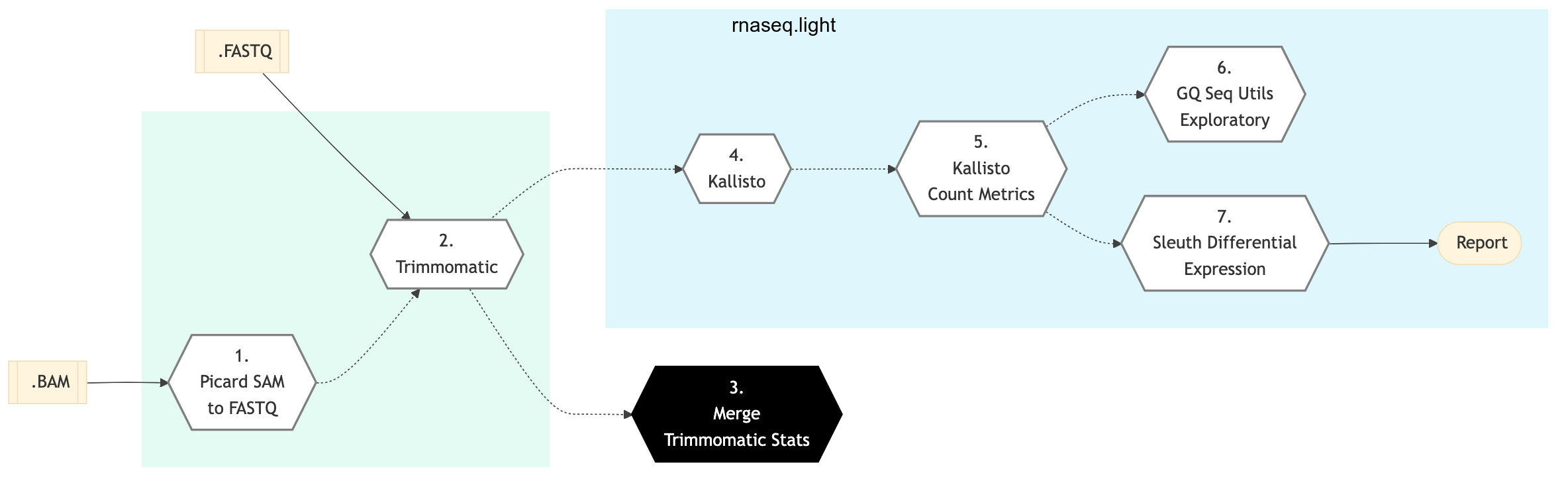
rnaseq light schema

Figure: Schema of RNA Sequencing (Light) pipeline

dada2 ampseq
RNA Seq (Light)

Picard SAM to FASTQ

Convert SAM/BAM files from the input readset file into FASTQ format if FASTQ files are not already specified in the readset file. Do nothing otherwise.

Trimmomatic

Raw reads quality trimming and removing of Illumina adapters is performed using Trimmomatic Tool. If an adapter FASTA file is specified in the config file (section ‘trimmomatic’, param ‘adapter_fasta’), it is used first. Else, ‘Adapter1’ and ‘Adapter2’ columns from the readset file are used to create an adapter FASTA file, given then to Trimmomatic. For PAIRED_END readsets, readset adapters are reversed-complemented and swapped, to match Trimmomatic Palindrome strategy. For SINGLE_END readsets, only Adapter1 is used and left unchanged.

This step takes as input files:

  1. FASTQ files from the readset file if available

  2. Else, FASTQ output files from previous picard_sam_to_fastq conversion of BAM files

Merge Trimmomatic Stats

The trim statistics per readset are merged at this step.

Kallisto

Run Kallisto on FastQ files for a fast estimate of abundance.

Kallisto Count Matrix

Use the output from Kallisto to create a transcript count matrix.

GQ Seq Utils Exploratory

Exploratory analysis using the gqSeqUtils R package adapted for RnaSeqLight.

Sleuth Differential Expression

Performs differential gene expression analysis using Sleuth. Analysis are performed both at a transcript and gene level, using two different tests: LRT and WT.

MultiQC

Aggregate results from bioinformatics analyses across many samples into a single report. MultiQC searches a given directory for analysis logs and compiles a HTML report. It’s a general use tool, perfect for summarizing the output from numerous bioinformatics tools. For details, refer to MultiQC Info.

This is a lightweight RNA Sequencing Expression analysis pipeline based on Kallisto technique. It is used for quick Quality Control (QC) in gene sequencing studies.

The central computational problem in RNA-seq remains the efficient and accurate assignment of short sequencing reads to the transcripts they originated from and using this information to infer gene expressions. Conventionally, read assignment is carried out by aligning sequencing reads to a reference genome, such that relative gene expressions can be inferred by the alignments at annotated gene loci. These alignment-based methods are conceptually simple, but the read-alignment step can be time-consuming and computationally intensive.

Alignment-free RNA quantification tools have significantly increased the speed of RNA-seq analysis. The alignment-free pipelines are orders of magnitude faster than alignment-based pipelines, and they work by breaking sequencing reads into k-mers and then performing fast matches to pre-indexed transcript databases. To achieve fast transcript quantification without compromising quantification accuracy, different sophisticated algorithms were implemented in addition to k- mer counting, such as pseudo-alignments by Kallisto technique and quasi-mapping along with GC and sequence-bias corrections using Salmon.

RNA Sequencing Light is a lightweight pipeline that performs quick QC and removes a major computation bottleneck in RNA Sequence analysis. Kallisto is two orders of magnitude faster than previous approaches and achieves similar accuracy. Kallisto pseudo-aligns reads to a reference, producing a list of transcripts that are compatible with each read while avoiding the alignment of individual bases. In the latest release of GenPipes, calls to kallisto quant are now aggregated by sample instead of by the readset for better performance.

See Schema tab for pipeline workflow. Check the README.md file for implementation details.
References
