Amplicon Sequencing Pipeline
Version 6.1.0
Warning
Amplicon supports only dada2 protocol by default. The Amplicon QIIME protocol is deprecated from GenPipes v5.x onward. To use QIIME` protocol, try an older version of GenPipes.
Command
user@machine:~$ genpipes ampliconseq [options] [--genpipes_file GENPIPES_FILE.sh]
user@machine:~$ bash GENPIPES_FILE.sh
Options
-d DESIGN, --design DESIGN

                              design file
-r READSETS, --readsets READSETS

                      readset file
-h show this help message and exit
--help show detailed description of pipeline and steps
-c CONFIG [CONFIG ...],
--config CONFIG [CONFIG ...]

                        config INI-style list of files; config parameters
                        are overwritten based on files order
-s STEPS, --steps STEPS step range e.g. '1-5', '3,6,7', '2,4-8'
-o OUTPUT_DIR, --output-dir OUTPUT_DIR

                        output directory (default: current)
-j {pbs,batch,daemon,slurm},
--job-scheduler {pbs,batch,daemon,slurm}

                        job scheduler type (default: slurm)
-f, --force               force creation of jobs even if up to date (default:
                          false)

                          Take the mem input in the ini file and force to have a
                          minimum of mem_per_cpu by correcting the number of cpu
                          (default: None)
--force_mem_per_cpu       FORCE_MEM_PER_CPU

                          Take the mem input in the ini file and force to have a
                          minimum of mem_per_cpu by correcting the number of cpu
                          (default: None)
--json-pt                 create JSON file for project_tracking database
                          ingestion (default: false i.e. JSON file will NOT be
                          created)
- -report                   create 'pandoc' command to merge all job markdown
                            report files in the given step range into HTML, if
                            they exist; if --report is set, --job-scheduler,
                            --force, --clean options and job up-to-date status
                            are ignored (default: false)
--clean                   create 'rm' commands for all job removable files in
                          the given step range, if they exist; if --clean is
                          set, --job-scheduler, --force options and job up-to-
                          date status are ignored (default: false)

                          Note: Do not use -g option with --clean, use '>' to redirect
                          the output of the --clean command option
-l {debug,info,warning,error,critical},
--log {debug,info,warning,error,critical}

                        log level (default: info)
--sanity-check            run the pipeline in `sanity check mode` to verify
                          all the input files needed for the pipeline to run
                          are available on the system (default: false)
--container {wrapper, singularity} <IMAGE PATH>

                        run pipeline inside a container providing a container
                        image path or accessible singularity hub path
--wrap [WRAP]             path to the GenPipes cvmfs wrapper script (default:
                          genpipes/ressources/container/bin/container_wrapper.sh,
                          a convenience option for using GenPipes in a container)
-v, --version show the version information and exit
-g GENPIPES_FILE, --genpipes_file GENPIPES_FILE

                          Commands for running the pipeline are output to this
                          file pathname. The data specified to pipeline command
                          line is processed and pipeline run commands are
                          stored in GENPIPES_FILE, if this option is specified
                          . Otherwise, the output will be redirected to stdout
                          . This file can be used to actually "run the
                          GenPipes Pipeline"
Important
Do not use -g option with -clean.
Use ‘>’ to redirect the output of the genpipes command to a file when using -clean option.
Example
user@machine:~$ genpipes ampliconseq -c $GENPIPES_INIS/ampliconseq/ampliconseq.base.ini \
                                        $GENPIPES_INIS/common_ini/rorqual.ini \
                                     -r readset.ampliconseq.txt \
                                     -s 1-8 \
                                     -g ampliconseqCommands.sh

user@machine:~$ bash ampliconseqCommands.sh
Tip
Depending upon the cluster where you are executing the pipeline, substitute the file name rorqual.ini in the command with the appropriate <DRAC server cluster name>.ini file located in the $GENPIPES_INIS/common_ini folder.
For e.g., rorqual.ini, fir.ini, or narval.ini.
Caution
It is recommended that you use the -g GENPIPES_CMD.sh option instead of redirecting the output of the pipeline command to a file via > GENPIPES_CMD.sh.
user@machine:~$ genpipes [pipeline] [options] -g genpipes_cmd.sh

user@machine:~$ bash genpipes_cmd.sh
user@machine:~$ genpipes [pipeline] [options] > genpipes_cmd.sh

user@machine:~$ bash genpies_cmd.sh
The > scriptfile method is supported but will be deprecated in a future GenPipes release.
You can download the test dataset for this pipeline here.
dada2
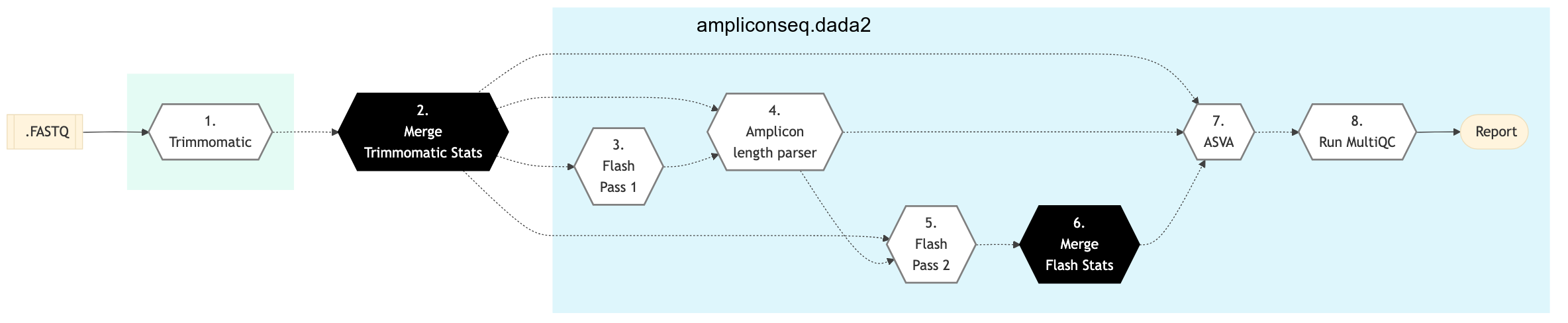
Figure: Schema of DADA2 Amplicon Sequencing protocol

DADA2
Trimmomatic16S
MiSeq raw reads adapter & primers trimming and basic QC is performed using Trimmomatic. If an adapter FASTA file is specified in the config file (section ‘trimmomatic’, param ‘adapter_fasta’), it is used first. Else, Adapter1, Adapter2, Primer1 and Primer2 columns from the readset file are used to create an adapter FASTA file, given then to Trimmomatic. Sequences are reversed-complemented and swapped.
This step takes as input files:
MiSeq paired-End FASTQ files from the readset file.
Merge Trimmomatic Stats
The trim statistics per readset are merged in this step.
Flash Pass 1
Perform first pass of FLASH. FLASH is a fast computational tool to extend the length of short reads by overlapping paired-end reads from fragment libraries that are sufficiently short.
Flash Pass 2
Perform second pass of FLASH to find the correct overlap between paired-end reads and extend the reads by stitching them together.
Amplicon Length Parser
In this step, we look at FLASH output to set amplicon lengths input for DADA2. As minimum eligible length, a given length needs to have at least 1% of the total number of amplicons.
Merge Flash Stats
The paired end merge statistics per readset are merged in this step.
Asva
This step checks for the design file required for the principal component analysis (PCA) based on amplicon sequence variant (ASV).
Run MultiQC
A quality control report for all samples is generated. See MultiQC documentation for details.
Amplicon sequencing (ribosomal RNA gene amplification analysis) is a highly targeted metagenomic pipeline used to analyze genetic variation in specific genomic regions. Amplicons are Polymerase Chain Reaction (PCR) products and the ultra-deep sequencing allows for efficient variant identification and characterization.
Uses of Amplicon sequencing
Diagnostic microbiology utilizes amplicon-based profiling that allows to sequence selected amplicons such as regions encoding 16S rRNA that are used for species identification.
Discovery of rare somatic mutations in complex samples such as tumors mixed with germline DNA.
GenPipes supports the DADA2 Amplicon sequencing protocol for recovering single-nucleotide resolved Amplicon Sequence Variants (ASVs) from the Amplicon data.
See Schema tab for the pipeline workflow. Check the README.md file for implementation details.
References
Amplicon Sequencing Readset File
Please make sure you use the special Amplicon Readset file format and not the general readset file format.