DNA Sequencing Pipeline
Version 6.1.0
DNA Sequencing Pipeline Revamp!
Starting from GenPipes v5.x onward, the DNA Sequencing Pipeline has been completely revamped. It is enhanced to include the functionality that was earlier provided in GenPipes v4.6.1 by the following standalone pipelines:
Tumor Pair Sequencing Pipeline Deprecated
DNA Sequencing (High Coverage) Pipeline. Deprecated
Command
user@machine:~$ genpipes dnaseq [-options ] [--genpipes_file GENPIPES_FILE.sh]
user@machine:~$ bash GENPIPES_FILE.sh
Options
-t {germline_snv, germline_sv, germline_high_cov, somatic_tumor_only, somatic_fastpass, somatic_ensemble, somatic_sv},

--type {germline_snv, germline_sv, germline_high_cov, somatic_tumor_only, somatic_fastpass, somatic_ensemble, somatic_sv}

                            DNAseq analysis type (default=germline_snv)
-p PAIRS, --pairs PAIRS

                            pairs file
                            format - patient_name,normal_sample_name,tumor_sample_name
-d DESIGN, --design DESIGN

                              design file
-r READSETS, --readsets READSETS

                      readset file
-h show this help message and exit
--help show detailed description of pipeline and steps
-c CONFIG [CONFIG ...],
--config CONFIG [CONFIG ...]

                        config INI-style list of files; config parameters
                        are overwritten based on files order
-s STEPS, --steps STEPS step range e.g. '1-5', '3,6,7', '2,4-8'
-o OUTPUT_DIR, --output-dir OUTPUT_DIR

                        output directory (default: current)
-j {pbs,batch,daemon,slurm},
--job-scheduler {pbs,batch,daemon,slurm}

                        job scheduler type (default: slurm)
-f, --force               force creation of jobs even if up to date (default:
                          false)

                          Take the mem input in the ini file and force to have a
                          minimum of mem_per_cpu by correcting the number of cpu
                          (default: None)
--force_mem_per_cpu       FORCE_MEM_PER_CPU

                          Take the mem input in the ini file and force to have a
                          minimum of mem_per_cpu by correcting the number of cpu
                          (default: None)
--json-pt                 create JSON file for project_tracking database
                          ingestion (default: false i.e. JSON file will NOT be
                          created)
- -report                   create 'pandoc' command to merge all job markdown
                            report files in the given step range into HTML, if
                            they exist; if --report is set, --job-scheduler,
                            --force, --clean options and job up-to-date status
                            are ignored (default: false)
--clean                   create 'rm' commands for all job removable files in
                          the given step range, if they exist; if --clean is
                          set, --job-scheduler, --force options and job up-to-
                          date status are ignored (default: false)

                          Note: Do not use -g option with --clean, use '>' to redirect
                          the output of the --clean command option
-l {debug,info,warning,error,critical},
--log {debug,info,warning,error,critical}

                        log level (default: info)
--sanity-check            run the pipeline in `sanity check mode` to verify
                          all the input files needed for the pipeline to run
                          are available on the system (default: false)
--container {wrapper, singularity} <IMAGE PATH>

                        run pipeline inside a container providing a container
                        image path or accessible singularity hub path
--wrap [WRAP]             path to the GenPipes cvmfs wrapper script (default:
                          genpipes/ressources/container/bin/container_wrapper.sh,
                          a convenience option for using GenPipes in a container)
-v, --version show the version information and exit
-g GENPIPES_FILE, --genpipes_file GENPIPES_FILE

                          Commands for running the pipeline are output to this
                          file pathname. The data specified to pipeline command
                          line is processed and pipeline run commands are
                          stored in GENPIPES_FILE, if this option is specified
                          . Otherwise, the output will be redirected to stdout
                          . This file can be used to actually "run the
                          GenPipes Pipeline"
Important
Do not use -g option with -clean.
Use ‘>’ to redirect the output of the genpipes command to a file when using -clean option.
Caution
The -p option is mandatory for running the following protocols:
somatic_fastpass
somatic_ensemble
somatic_sv
The pair file specified via the -p option is a comma-separated file with the following format:
<patient_name>,<normal_sample_name>,<tumor_sample_name>
The patient name value specified in the first column of the pair file (the patient/sample pair name) must be unique. You can specify multiple patients/sample pairs data, one per line, in the pair file.
For example:
tumorPair_CEPHmixture_chr19,tumorPair_CEPHmixture_chr19_normal,tumorPair_CEPHmixture_chr19_tumor
john_doe_tumorPair_CEPHmixture_chr19,john_doe_tumorPair_CEPHmixture_chr19_normal,john_doe_tumorPair_CEPHmixture_chr19_tumor

...
Example
Germline
user@machine:~$ genpipes dnaseq -t germline_snv
                            -c $GENPIPES_INIS/dnaseq/dnaseq.base.ini \
                                $GENPIPES_INIS/common_ini/rorqual.ini \
                            -r readset.dnaseq.txt \
                            -s 1-27 \
                            -j slurm \
                            -g dnaseq_germline_snv_cmd.sh

user@machine:~$ bash dnaseq_germline_snv_cmd.sh
Tip
Depending upon the cluster where you are executing the pipeline, substitute the file name rorqual.ini in the command with the appropriate <DRAC server cluster name>.ini file located in the $GENPIPES_INIS/common_ini folder.
For e.g., rorqual.ini, fir.ini, or narval.ini.
user@machine:~$ genpipes dnaseq -t germline_sv
                                -c $GENPIPES_INIS/dnaseq/dnaseq.base.ini \
                                    $GENPIPES_INIS/dnaseq/dnaseq.sv.ini \
                                    $GENPIPES_INIS/common_ini/rorqual.ini \
                                -r readset.dnaseq.txt \
                                -s 1-25 \
                                -g dnaseq_germ_sv_cmd.sh

user@machine:~$ bash dnaseq_germ_sv_cmd.sh
Tip
Depending upon the cluster where you are executing the pipeline, substitute the file name rorqual.ini in the command with the appropriate <DRAC server cluster name>.ini file located in the $GENPIPES_INIS/common_ini folder.
For e.g., rorqual.ini, fir.ini, or narval.ini.
user@machine:~$ genpipes dnaseq -t germline_high_cov \
                                -c $GENPIPES_INIS/dnaseq/dnaseq.base.ini \
                                    $GENPIPES_INIS/dnaseq/dnaseq.high_cov.ini  \
                                    $GENPIPES_INIS/common_ini/rorqual.ini \
                                -r readset.dnaseq.txt \
                                -s 1-15 \
                                -g dnaseq_germ_high_cov_cmd.sh

user@machine:~$ bash dnaseq_germ_high_cov_cmd.sh
Tip
Depending upon the cluster where you are executing the pipeline, substitute the file name rorqual.ini in the command with the appropriate <DRAC server cluster name>.ini file located in the $GENPIPES_INIS/common_ini folder.
For e.g., rorqual.ini, fir.ini, or narval.ini.
Somatic
user@machine:~$ genpipes dnaseq -t somatic_tumor_only \
                                -c $GENPIPES_INIS/dnaseq/dnaseq.base.ini \
                                    $GENPIPES_INIS/common_ini/rorqual.ini \
                                -r readset.somatic_tumor_only.txt \
                                -s 1-38 \
                                -j slurm \
                                -g dnaseq_somatic_tumor_cmd.sh

user@machine:~$ bash dnaseq_somatic_tumor_cmd.sh
Tip
Depending upon the cluster where you are executing the pipeline, substitute the file name rorqual.ini in the command with the appropriate <DRAC server cluster name>.ini file located in the $GENPIPES_INIS/common_ini folder.
For e.g., rorqual.ini, fir.ini, or narval.ini.
user@machine:~$ genpipes dnaseq -t somatic_fastpass \
                                -c $GENPIPES_INIS/dnaseq/dnaseq.base.ini \
                                    $GENPIPES_INIS/dnaseq/dnaseq.cancer.ini  \
                                    $GENPIPES_INIS/common_ini/rorqual.ini \
                                -r readset.somatic_fastpass.txt \
                                -p pairs.somatic_fastpass.csv \
                                -s 1-38 \
                                -j slurm \
                                -g dnaseq_somatic_fastpass_cmd.sh

user@machine:~$ bash dnaseq_somatic_fastpass_cmd.sh
Tip
Depending upon the cluster where you are executing the pipeline, substitute the file name rorqual.ini in the command with the appropriate <DRAC server cluster name>.ini file located in the $GENPIPES_INIS/common_ini folder.
For e.g., rorqual.ini, fir.ini, or narval.ini.
user@machine:~$ genpipes dnaseq -t somatic_ensemble \
                                -c $GENPIPES_INIS/dnaseq/dnaseq.base.ini \
                                    $GENPIPES_INIS/dnaseq/dnaseq.cancer.ini  \
                                    $GENPIPES_INIS/common_ini/rorqual.ini \
                                -r readset.somatic_ensemble.txt \
                                -p pairs.somatic_ensemble.csv \
                                -s 1-38 \
                                -j slurm \
                                -g dnaseq_somatic_ensemble_cmd.sh

user@machine:~$ bash dnaseq_somatic_ensemble_cmd.sh
Tip
Depending upon the cluster where you are executing the pipeline, substitute the file name rorqual.ini in the command with the appropriate <DRAC server cluster name>.ini file located in the $GENPIPES_INIS/common_ini folder.
For e.g., rorqual.ini, fir.ini, or narval.ini.
user@machine:~$ genpipes dnaseq -t somatic_sv \
                                -c $GENPIPES_INIS/dnaseq/dnaseq.base.ini \
                                    $GENPIPES_INIS/dnaseq/dnaseq.cancer.ini  \
                                    $GENPIPES_INIS/common_ini/rorqual.ini \
                                -r readset.somatic_sv.txt \
                                -p pairs.somatic_sv.csv \
                                -s 1-38 \
                                -j slurm \
                                -g dnaseq_somatic_sv_cmd.sh

user@machine:~$ bash dnaseq_somatic_sv_cmd.sh
Tip
Depending upon the cluster where you are executing the pipeline, substitute the file name rorqual.ini in the command with the appropriate <DRAC server cluster name>.ini file located in the $GENPIPES_INIS/common_ini folder.
For e.g., rorqual.ini, fir.ini, or narval.ini.
Caution
It is recommended that you use the -g GENPIPES_CMD.sh option instead of redirecting the output of the pipeline command to a file via > GENPIPES_CMD.sh.
user@machine:~$ genpipes [pipeline] [options] -g genpipes_cmd.sh

user@machine:~$ bash genpipes_cmd.sh
user@machine:~$ genpipes [pipeline] [options] > genpipes_cmd.sh

user@machine:~$ bash genpies_cmd.sh
The > scriptfile method is supported but will be deprecated in a future GenPipes release.
Use the DNA sequencing test dataset for this pipeline.
Germline
Figure below shows the schema of the DNA sequencing Germline SNV protocol.
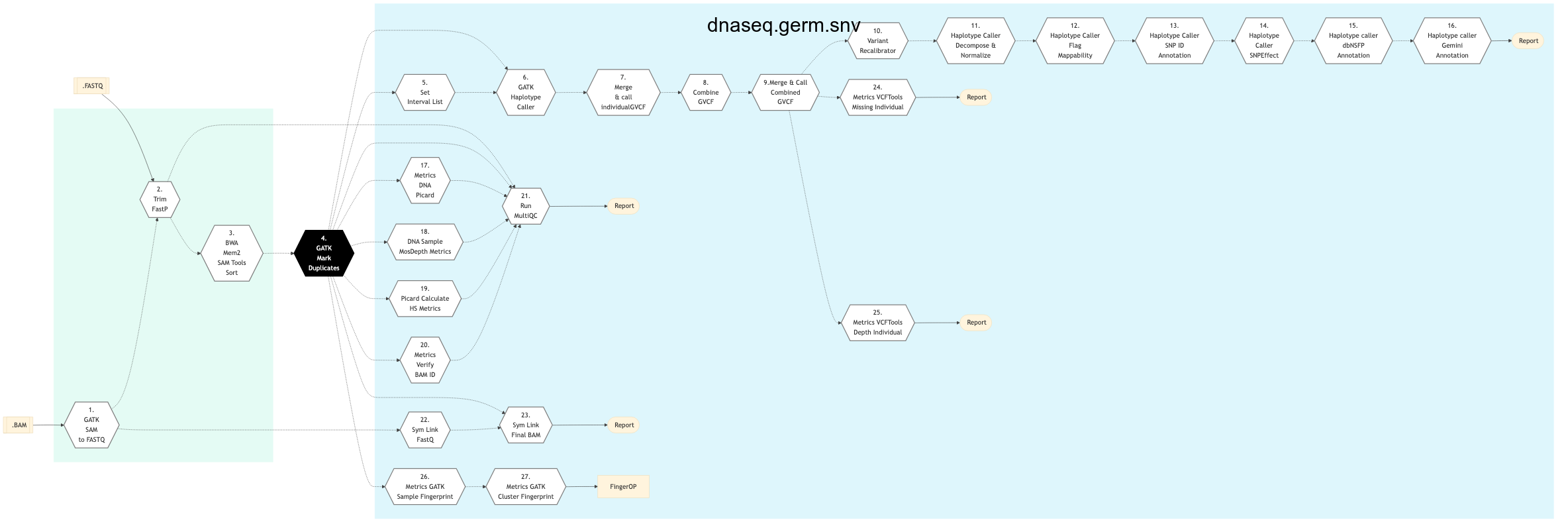
Figure: Schema - Germline SNV DNA Sequencing protocol

Figure below shows the schema of the DNA sequencing Germline SV protocol.
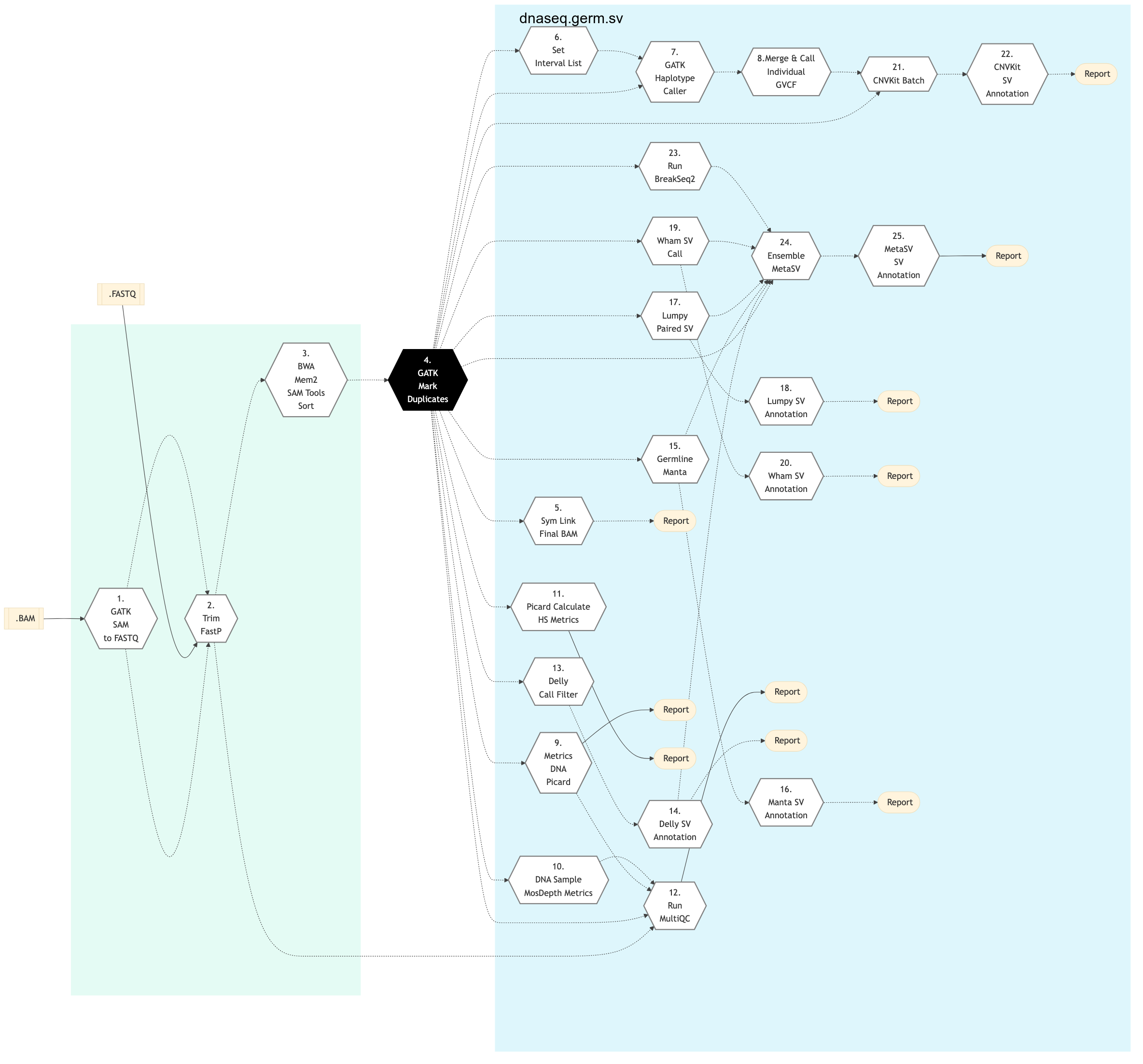
Figure: Schema - Germline SV DNA Sequencing protocol
Figure below shows the schema of the DNA sequencing Germline High Coverage protocol.
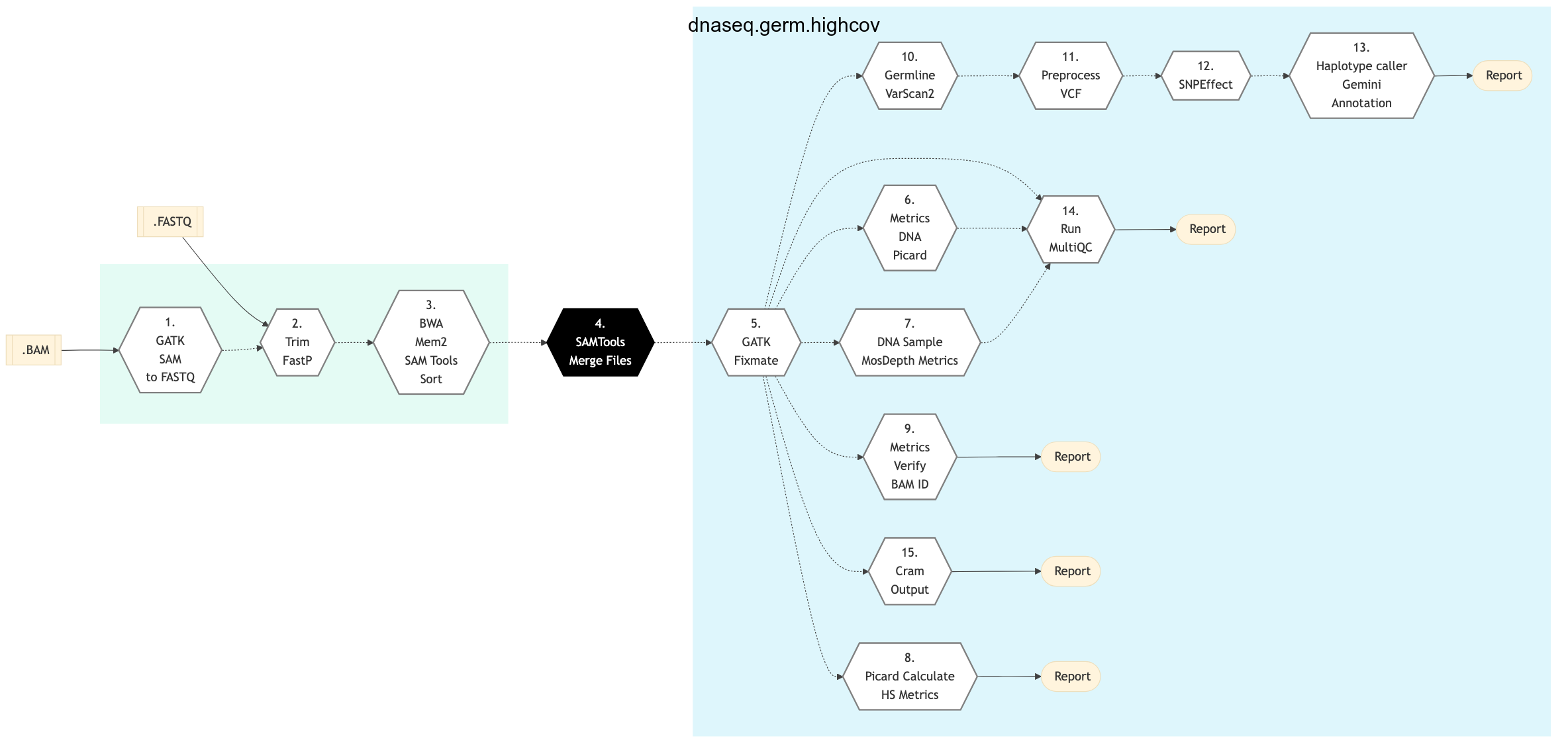
Figure: Schema - Germline High Coverage DNA Sequencing protocol
Somatic
Figure below shows the schema of the DNA sequencing Somatic Tumor only protocol.
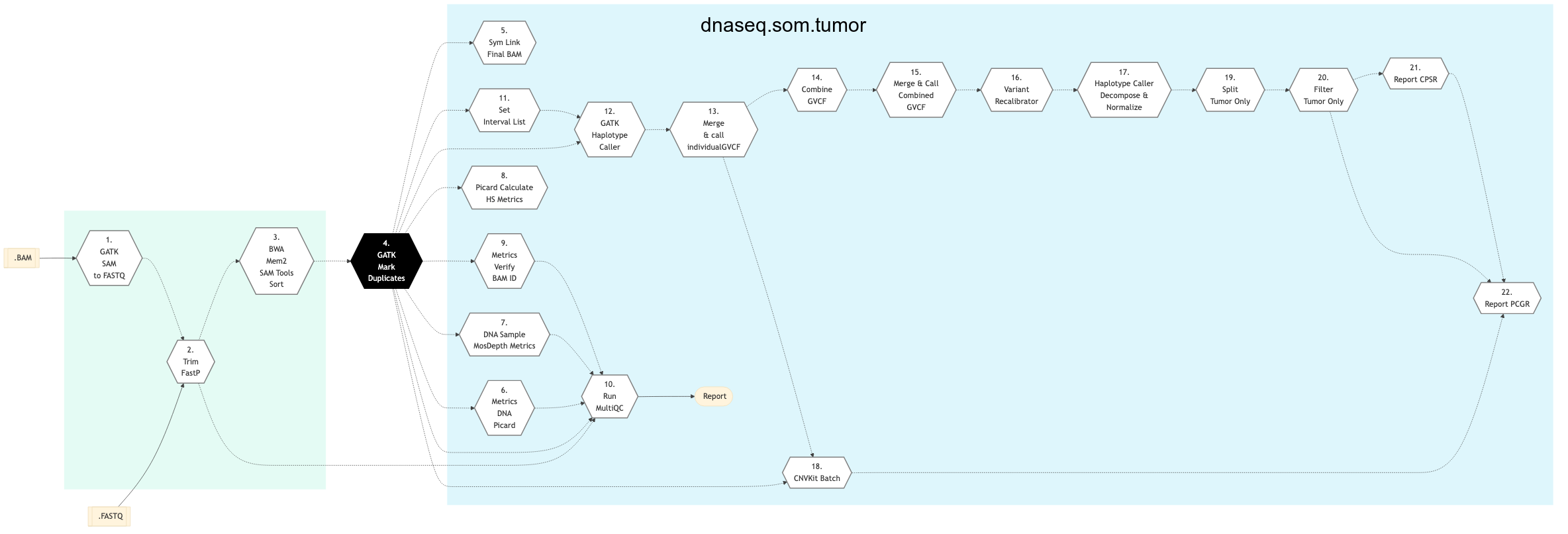
Figure: Schema - Somatic Tumor Only DNA Sequencing protocol
Figure below shows the schema of the DNA sequencing Somatic Fastpass protocol.
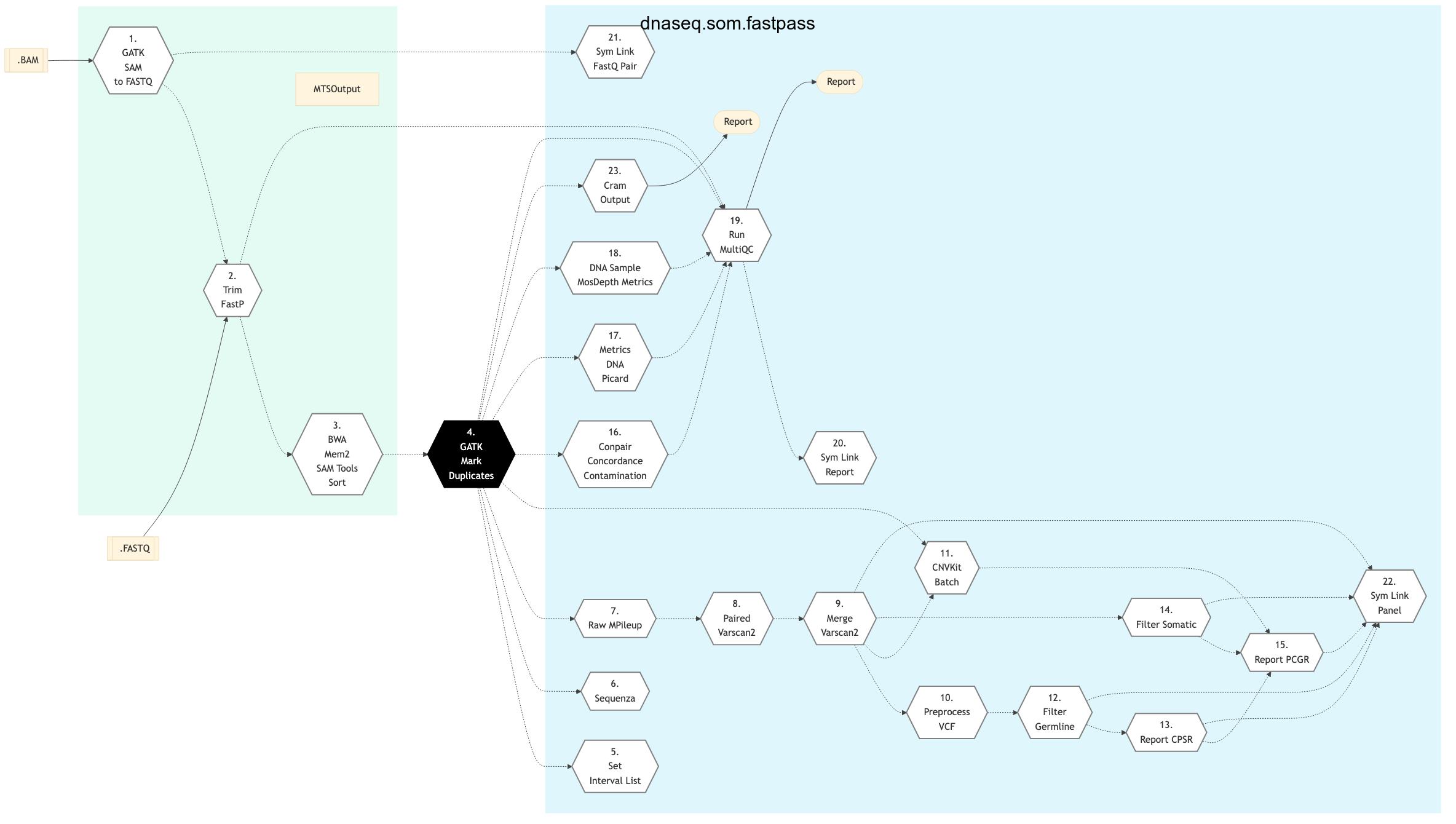
Figure: Schema - Somatic Fastpass DNA Sequencing protocol
Figure below shows the schema of the DNA sequencing Somatic Ensemble protocol.
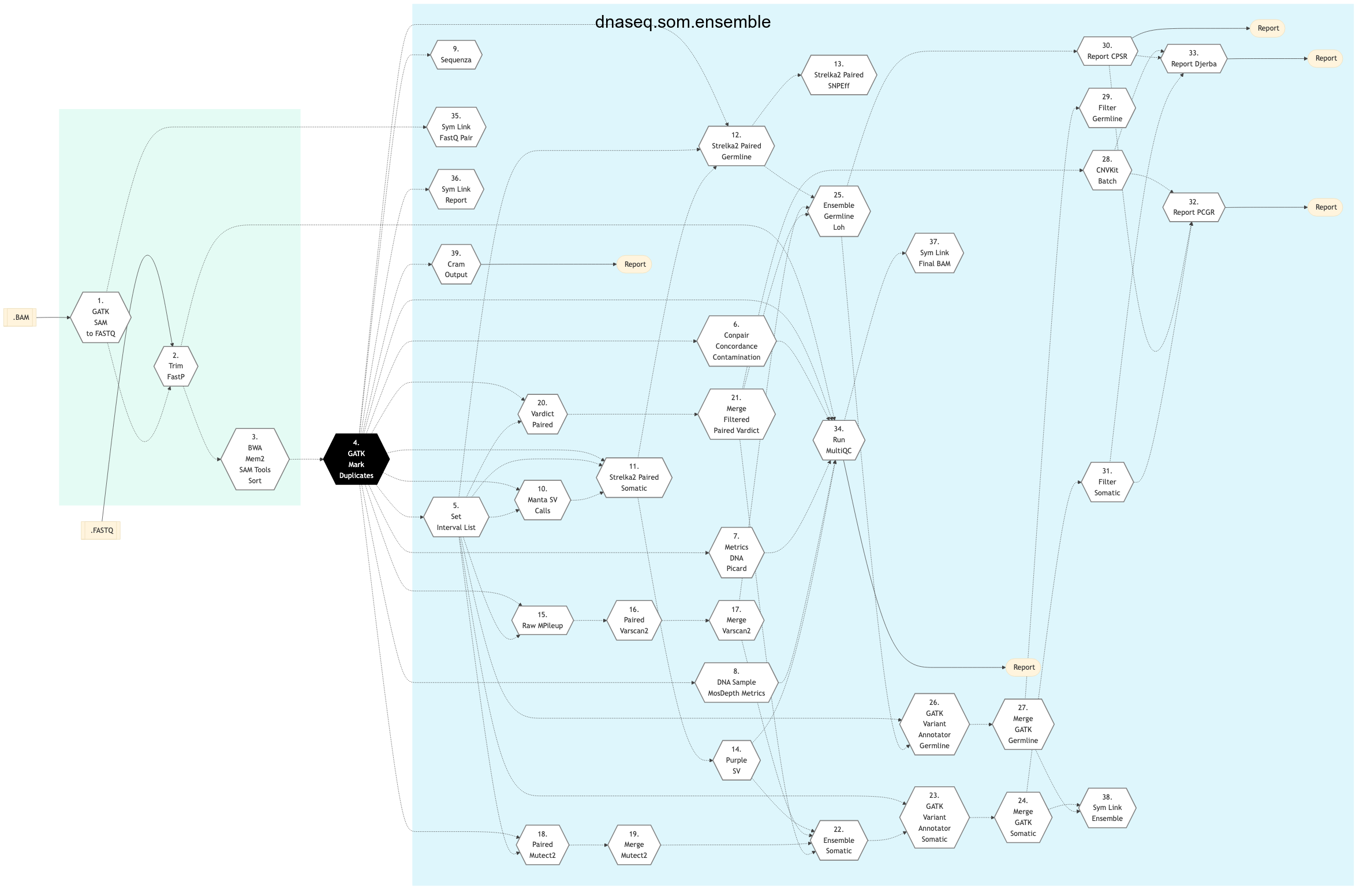
Figure: Schema - Somatic Ensemble DNA Sequencing protocol
Figure below shows the schema of the DNA sequencing Somatic SV protocol.
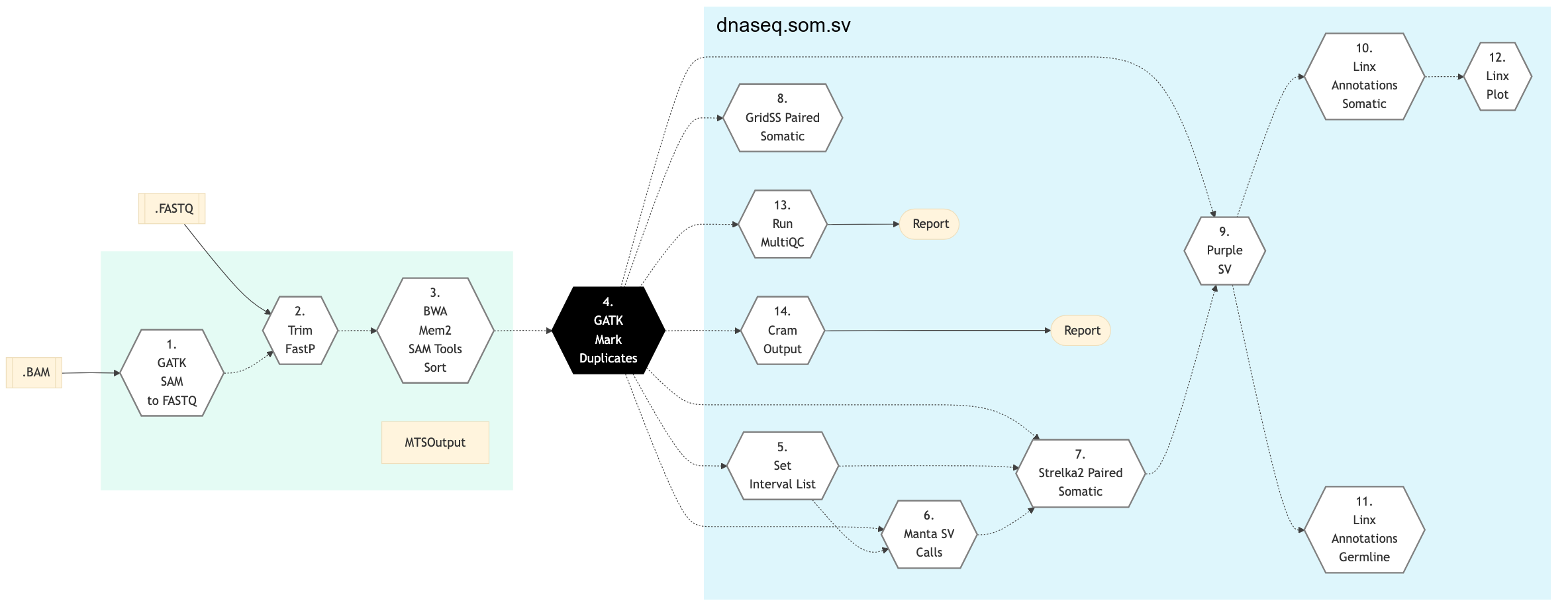
Figure: Schema - Somatic SV DNA Sequencing protocol
Germline
Somatic
GATK SAM to FastQ
Convert SAM/BAM files from the input readset file into FASTQ format if FASTQ files are not already specified in the readset file. Do nothing otherwise.
Trim FastP
FastP: A tool designed to provide fast all-in-one preprocessing for FastQ files. This tool is developed in C++ with multi-threading supported to afford high performance.
BWA Mem2 SAMTools Sort
The filtered reads are aligned to a reference genome. The alignment is done per sequencing readset. The alignment software used is BWA-MEM2 with algorithm: bwa mem2. BWA output BAM files are then sorted by coordinate using SAMTools This step takes as input files:
Trimmed FASTQ files if available
Else, FASTQ files from the readset file if available
Else, FASTQ output files from previous picard_sam_to_fastq conversion of BAM files
GATK Mark Duplicates
This step marks duplicates. Aligned reads per sample are duplicates if they have the same 5’ alignment positions (for both mates in the case of paired-end reads). All but the best pair (based on alignment score) will be marked as a duplicate in the BAM file. Marking duplicates is done using GATK.
Set Interval List
Create an interval list with ScatterIntervalsByNs from GATK: GATK.
Used for creating a broken-up interval list that can be used for scattering a variant-calling pipeline in a way that will not cause problems at the edges of the intervals. By using large enough N blocks (so that the tools will not be able to anchor on both sides) we can be assured that the results of scattering and gathering the variants with the resulting interval list will be the same as calling with one large region.
GATK Haplotype Caller
GATK Haplotype Caller is used for SNPs and small indels.
Merge and call individual GVCF
Merges the gvcfs of haplotype caller and also generates a per sample vcf containing genotypes.
Combine GVCF
Combine the per sample gvcfs of haplotype caller into one main file for all sample.
Merge and call combined GVCF
Merges the combined gvcfs and also generates a general vcf containing genotypes.
Variant Recalibrator
This step involves GATK variant recalibrator. The purpose of the variant recalibrator is to assign a well-calibrated probability to each variant call in a call set. You can then create highly accurate call sets by filtering based on this single estimate for the accuracy of each call. The approach taken by variant quality score recalibration is to develop a continuous, covarying estimate of the relationship between SNP call annotations (QD, MQ, HaplotypeScore, and ReadPosRankSum, for example) and the probability that a SNP is a true genetic variant versus a sequencing or data processing artifact. This model is determined adaptively based on “true sites” provided as input, typically HapMap 3 sites and those sites found to be polymorphic on the Omni 2.5M SNP chip array. This adaptive error model can then be applied to both known and novel variation discovered in the call set of interest to evaluate the probability that each call is real. The score that gets added to the INFO field of each variant is called the VQSLOD. It is the log odds ratio of being a true variant versus being false under the trained Gaussian mixture model. Using the tranche file generated by the previous step the ApplyRecalibration walker looks at each variant’s VQSLOD value and decides which tranche it falls in. Variants in tranches that fall below the specified truth sensitivity filter level have their filter field annotated with its tranche level. This will result in a call set that simultaneously is filtered to the desired level but also has the information necessary to pull out more variants for a higher sensitivity but a slightly lower quality level.
Haplotype caller decompose and normalize
Performs decompose/normalization for variant comparison at the haplotype level. Replay the variants from the VCF into the reference and determine whether variants match by whether the resulting Haplotype match.
Haplotype caller flag mappability
Mappability annotation applied to haplotype caller vcf. An in-house database identifies regions in which reads are confidently mapped to the reference genome.
Haplotype caller SNP ID annotation
dbSNP annotation applied to haplotype caller vcf. The .vcf files are annotated for dbSNP using the software SnpSift (from the SNPEff Suite).
Haplotype caller SNP Effect
Variant effect annotation applied to haplotype caller vcf. The .vcf files are annotated for variant effects using the SNPEff Suite software. SnpEff annotates and predicts the effects of variants on genes (such as amino acid changes).
Haplotype caller dbNSFP annotation
Additional SVN annotations applied to haplotype caller vcf. Provides extra information about SVN by using numerous published databases. Applicable to human samples. Databases available include Biomart (adds GO annotations based on gene information) and dbNSFP (an integrated database of functional annotations from multiple sources for the comprehensive collection of human non-synonymous SNPs. It compiles prediction scores from four prediction algorithms (SIFT, Polyphen2, LRT and MutationTaster), three conservation scores (PhyloP, GERP++ and SiPhy) and other function annotations).
Haplotype caller Gemini annotation
Uses Haplotype caller to call germline SNPs and indels via local re-assembly of Haplotype for exploring genetic variations using the Gemini annotations.
Metrics DNA Picard
This step generates metrics with picard, including CollectMultipleMetrics, CollectOxoGMetrics, CollectGcBiasMetrics, CollectWgsMetrics, CollectHsMetrics, CollectInsertSizeMetrics, CollectSequencingArtifactMetrics, CollectQualityYieldMetrics, CollectQualityByCycle, and CollectBaseDistributionByCycle.
DNA Sample MosDepth Metrics
Calculate depth stats for captured regions with Mosdepth.
Picard Calculate HS Metrics
Compute on target percent of hybridization based capture happens in this step.
Metrics Verify BAM ID
In this step, VerifyBAMID software is used to verify whether the reads in particular file match previously known genotypes for an individual (or group of individuals), and checks whether the reads are contaminated as a mixture of two samples.
Run MultiQC
Aggregate results from bioinformatics analyses across many samples into a single report. MultiQC searches a given directory for analysis logs and compiles a HTML report. It’s a general use tool, perfect for summarizing the output from numerous bioinformatics tools.
Report Djerba
This step generates the Djerba <https://github.com/oicr-gsi/djerba> report for the analysis.
Sym Link FastQ
Automated symbolic linking of FASTQ files.
Sym Link Final BAM
Creates symbolic links of final BAM for delivery of data to the clients.
Metrics VCFTools Missing Individual
This step uses VCFtools and –missing_indv option to generate a file reporting the missingness factor in the analysis on a per-individual basis. It takes bgzipped .vcf file as input and creates .imiss flat file indicating missingness.
Metrics VCFTools Depth Individual
This step uses VCFtools and –depth option to generate a file containing the mean depth per individual. It takes as input bgzipped .vcf file and creates a .idepth flat file.
Metrics GATK Sample Fingerprint
CrosscheckFingerprints (Picard) functionality in GATK toolkit is used to cross-check readgroups, libraries, samples, or files to determine if all data in the set of input files appears to come from the same individual. In this step, sample SAM/BAM or VCF file is taken as input and a fingerprint file is generated using CrosscheckFingerprints (Picard) in GATK. It checks the sample identity of the sequence/genotype data in the provided file (SAM/BAM or VCF) against a set of known genotypes in the supplied genotype file (in VCF format).
Metrics GATK Cluster Fingerprint
In this step, ClusterCrosscheckMetrics function from GATK is used as a follow-up step to running CrosscheckFingerprints created in the Metrics GATK Sample Fingerprint step earlier. There are cases where one would like to identify a few groups out of a collection of many possible groups (say to link a bam to it’s correct sample in a multi-sample vcf. In this step, sample SAM/BAM or VCF file is taken as input and a fingerprint file is generated.
Delly2 Call Filter
This step uses normal and tumor final BAMs as input and generates a binary variant call format (BCF) file as output. It utilizes Delly2, an integrated structural variant (SV) prediction method that can discover genotype and visualize deletions, tandem duplications, inversions and translocations at single-nucleotide resolution in short-read massively parallel sequencing data. It uses paired-ends, split-reads and read-depth to sensitively and accurately delineate genomic rearrangements throughout the genome. Structural variants can be annotated using Delly-sansa and visualized using Delly-maze or Delly-suave.
Delly2 SV Annotation
SV Annotation step utilizes the BCF file generated in previous Delly2 Call Filter step and performs genome annotation at various levels. At the nucleotid level it tries to identify the physical location of the SV dna sequences. Next, at the protein level the annotation process tries to determine the possible functions of the SV genes. Lastly, at the process-level annotation, it tries to identify the pathways and processes in which different SV genes interact, assembling an efficient functional annotation. For more details on annotation see Genome Annotations.
Germline Manta
Manta calls structural variants (SVs) and indels from mapped paired-end sequencing reads. It is optimized for analysis of germline variation in small sets of individuals and somatic variation in tumor/normal sample pairs. Manta discovers, assembles and scores large-scale SVs, medium-sized indels and large insertions within a single efficient workflow. Manta accepts input read mappings from BAM or CRAM files and reports all SV and indel inferences in VCF 4.1 format.
** Manta SV Annotation**
This step uses the VCF file generated in previous step and performs SV annotations to compares types and breakpoints for candidate SVs from different callsets and enables fast comparison of SVs to genomic features such as genes and repetitive regions, as well as to previously established SV datasets.
Lumpy Paired SV
This step uses Lumpy for structural variant discovery in the given input file. The output is available in BAM format.
Comprehensive discovery of structural variation (SV) from whole genome sequencing data requires multiple detection signals including read-pair, split-read, read-depth and prior knowledge. Owing to technical challenges, extant SV discovery algorithms either use one signal in isolation, or at best use two sequentially. Lumpy is a novel SV discovery framework that naturally integrates multiple SV signals jointly across multiple samples. It yields improved sensitivity, especially when SV signal is reduced owing to either low coverage data or low intra-sample variant allele frequency.
Lumpy SV Annotation
This step performs LumPy SV Annotation for mapping and characterization of SVs.
Wham SV Call
Wham (Whole-genome Alignment Metrics) provides a single, integrated framework for both structural variant calling and association testing, thereby bypassing many of the difficulties that currently frustrate attempts to employ SVs in association testing. This step returns a VCF file.
Wham SV Annotation
This step uses the VCF file generated in the previous step Wham SV Call and performs SV annotations.
CNVkit Batch
A copy number variation (CNV) is when the number of copies of a particular gene varies from one individual to the next. Copy-number variation (CNV) is a large category of structural variation, which includes insertions, deletions and duplications. For copy number variation analysis, GenPipes DNA Sequencing pipeline (-t sv option) uses CNVkit that allows for CNV calling on single samples (e.g., tumor samples).
CNVkit provides an advantageous way to run the entire pipeline using the batch option to run various stages in copy number calling pipeline such as:
Create target/anti-target bed files
Gather read depths for those regions
Compile a copy number reference
Correct biases in tumor samples while calculating copy ratios
Mark copy number segments
CNVkit SV Annotation
This step performs CNVkit SV annotation.
Run BreakSeq2
In this step, BreakSeq2 is used to combine DNA double-strand breaks (DSBs) labeling with next generation sequencing (NGS) to map chromosome breaks with improved sensitivity and resolution. It is an ultra fast and accurate nucleotide-resolution analysis of structural variants.
Ensemble MetaSV
MetaSV uses highly effective ensemble approach for calling SVs. It is an integrated SV caller which leverages multiple orthogonal SV signals for high accuracy and resolution. MetaSV proceeds by merging SVs from multiple tools for all types of SVs. It also analyzes soft-clipped reads from alignment to detect insertions accurately since existing tools underestimate insertion SVs. Local assembly in combination with dynamic programming is used to improve breakpoint resolution. Paired-end and coverage information is used to predict SV genotypes.
MetaSV Annotation
This step uses output from previous step and performs SV annotations.
SAMTools Merge Files
BAM readset files are merged into one file per sample. Merge is done using SAMTools. This step takes as input files:
Aligned and sorted BAM output files from previous bwa_mem_picard_sort_sam step if available
Else, BAM files from the readset file
GATK Fixmate
Verify mate-pair information between mates and fix if needed. This ensures that all mate-pair information is in sync between each read and its mate pair. Fix is done using Picard.
Germline Varscan2
This step uses VarScan caller for insertions and deletions.
Preprocess VCF
Preprocess VCF for loading into an annotation database - Gemini. Processes include normalization and decomposition of MNPs by Vt and VCF format modification for correct loading into Gemini.
SNP Effect
Variant effect annotation. The .vcf files are annotated for variant effects using the SnpEff software. SnpEff annotates and predicts the effects of variants on genes (such as amino acid changes).
Arguments:
input_file (str)
The input vcf file to annotate for variant effects. Default is allSamples.hc.vqsr.vt.mil.snpId.vcf.gz.
output (str)
The output vcf file. Default is allSamples.hc.vqsr.vt.mil.snpId.snpeff.vcf. job_name (str): The name of the job. Default is snp_effect.hc.
Split Tumor Only
Splits the merged VCF produced in previous steps to generate a report on a per-patient basis. The merged VCF is split using the BCFTools split function with the removal of homozygous reference calls. Creates one VCF per patient to be used for downstream reporting.
Filter Tumor Only
Applies custom script to inject FORMAT information - tumor/normal DP and VAP into the INFO field the filter on those generated fields.
Report CPSR
Creates a CPSR Germline Report where input is the filtered ensemble germline vcf and output is the html report and additional flat files.
Report PCGR
Creates a PCGR Somatic Germline Report where input is the filtered ensemble germline vcf and the output is the html report and additional flat files.
Sequenza Step
Sequenza is a novel set of tools providing a fast python script to genotype cancer samples, and an R package to estimate cancer cellularity, ploidy, genome wide copy number profile and infer for mutated alleles.
Raw Mpileup
Full pileup (optional). A raw Mpileup file is created using samtools Mpileup and compressed in gzipped format. One packaged Mpileup file is created per sample/chromosome.
Paired Var Scan 2
Variant calling and somatic mutation/CNV detection for next-generation sequencing data. Uses VarScan 2 for Somatic mutation and copy number alteration discovery in cancer by exome sequencing VarScan 2 thresholds based on DREAM3 results generated by SC INFO field remove to prevent collision with Samtools output during ensemble.
Merge Var Scan 2
Merge Mpileup files per sample/chromosome into one compressed gzip file per sample.
Filter Germline
Applies custom script to inject FORMAT information - tumor/normal DP and VAP into the INFO field the filter on those generated fields.
Filter Somatic
Applies custom script to inject FORMAT information - tumor/normal DP and VAP into the INFO field the filter on those generated fields.
Conpair Concorance Contamination
Conpair is a concordance and contamination estimator for tumor–normal pairs. This step is a quality control process to ensure the normal sample and cancer sample come from the same patient. It estimates this by determining the amount of normal sample in the tumor and the amount of tumor in normal sample.
Sym Link Report
Generates symbolic links for Tumor Pair pipeline report.
Sym Link FASTQ Pair
Generates symbolic links for FASTQ Pair output files.
Sym Link Panel
This step create symbolic links of panel variants for generating reports and deliverable to the clients.
Sym Link Ensemble
Generates symbolic links for Ensemble processing output.
Manta SV Calls
Manta calls structural variants (SVs) and indels from mapped paired-end sequencing reads. It is optimized for analysis of germline variation in small sets of individuals and somatic variation in tumor/normal sample pairs. Manta discovers, assembles and scores large-scale SVs, medium-sized indels and large insertions within a single efficient workflow.
Manta accepts input read mappings from BAM or CRAM files and reports all SV and indel inferences in VCF 4.1 format
Strelka2 Paired Somatic
Strelka2 is a fast and accurate small variant caller optimized for analysis of germline variation in small cohorts and somatic variation in tumor/normal sample pairs This implementation is optimized for somatic calling.
Strelka2 Paired Germline
Strelka2 is a fast and accurate small variant caller optimized for analysis of germline variation in small cohorts and somatic variation in tumor/normal sample pairs This implementation is optimized for germline calling in cancer pairs.
Strelka2 Paired SnpEff
Strelka2 is a fast and accurate small variant caller optimized for analysis of germline variation in small cohorts and somatic variation in tumor/normal sample pairs This implementation is optimized for germline calling in cancer pairs.
Purple Ploidy Estimator
Purple is a purity ploidy estimator for whole genome sequenced (WGS) data. It combines B-allele frequency (BAF) from AMBER, read depth ratios from COBALT, somatic variants and structural variants to estimate the purity and copy number profile of a tumor sample.
Purple SV
Runs PURPLE with the optional structural variant input VCFs. PURPLE is a purity ploidy estimator for whole genome sequenced (WGS) data.
It combines B-allele frequency (BAF) from AMBER, read depth ratios from COBALT, somatic variants and structural variants to estimate the purity and copy number profile of a tumor sample.
Paired Mutect2
GATK Mutect2 Overview caller for SNVs and Indels.
Merge Mutect2
Merge SNVs and indels for GATK MuTect2 Overview Replace TUMOR and NORMAL sample names in VCF to the exact tumor/normal sample names Generate a somatic VCF containing only PASS variants
VarDict Paired
In this step, VarDict caller is used for SNVs and Indels. Note: variants are filtered to remove instance where REF == ALT and REF modified to ‘N’ when REF is AUPAC nomenclature
Merge Filter Paired VarDict
The fully merged VCF is filtered using following steps:
Retain only variants designated as somatic by VarDict: either StrongSomatic or LikelySomatic
Somatics identified in step 1 must have PASS filter.
Ensemble Somatic
Apply Bcbio.variations ensemble approach for GATK MuTect2 Overview, VarDict, Samtools and VarScan 2 calls Filter ensemble calls to retain only calls overlapping 2 or more callers
GATK Variant Annotator Somatic
Add VCF annotations to ensemble VCF: Standard and Somatic annotations.
Merge GATK Variant Annotator Somatic
Merge annotated somatic VCFs.
Ensemble Germline Loh
This step applies Bcbio.variations ensemble approach for VarDict, Samtools and VarScan 2 calls. It also filters ensemble calls to retain only calls overlapping 2 or more callers.
GATK Variant Annotator Germline
Add VCF annotations to ensemble VCF: most importantly the AD field.
Merge GATK Variant Annotator Germline
Merge annotated germline and LOH VCFs.
GRIDSS Paired Somatic
GRIDSS is a module software suite containing tools useful for the detection of genomic rearrangements. GRIDSS includes a genome-wide break-end assembler, as well as a structural variation caller for Illumina sequencing data. GRIDSS calls variants based on alignment-guided positional de Bruijn graph genome-wide break-end assembly, split read, and read pair evidence.
Linx Annotations Somatic
The LINX algorithm classifies somatic structural variation in tumors. It is an annotation, interpretation and visualization tool for structural variants. The primary function is grouping together individual SV calls into distinct events and properly classify and annotating the event to understand both its mechanism and genomic impact.
LINX helps in the interpretation of structural variant and copy number data derived from short-read, whole-genome sequencing. It classifies raw structural variant calls into distinct events and predicts their effect on the local structure of the derivative chromosome and the functional impact on affected genes. Visualizations facilitate further investigation of complex rearrangements. LINX allows insights into a diverse range of structural variation events and can reliably detect pathogenic rearrangements, including gene fusions, immunoglobulin enhancer rearrangements, intragenic deletions, and duplications.
Linx Annotations Germline
Though LINX is designed primarily for somatic SV, it can also be run in a more limited germline mode to annotate and interpret germline rearrangements
Linx Plot
LINX Plot offers visualization methods that provide insight into complex genomic rearrangements. It leverages the integrated structural variant and copy number calling to cluster individual structural variants into higher order events and chains them together to predict local derivative chromosome structure.
CRAM Output
Generate long term storage version of the final alignment files in CRAM format. Using this function will include the original final BAM file into the removable file list.
DNA sequencing is the process of determining the sequence of nucleotides in a section of DNA. Over the past decade, long-read, single-molecule DNA sequencing technologies have emerged as powerful players in genomics. With the ability to generate reads tens to thousands of kilobases in length with an accuracy approaching that of short-read sequencing technologies, these platforms have proven their ability to resolve some of the most challenging regions of the human genome, detect previously inaccessible structural variants and generate some of the first telomere-to-telomere assemblies of whole chromosomes.
Burrows-Wheeler Alignment tool, BWA, is a new read alignment package that is based on backward search with Burrows–Wheeler Transform (BWT), to efficiently align short sequencing reads against a large reference sequence such as the human genome, allowing mismatches and gaps. BWA is ∼10–20 times faster than Mapping and Assembly with Quality, MAQ, while achieving similar accuracy. In addition, BWA outputs alignment in the new standard SAM (Sequence Alignment/Map) format. Variant calling and other downstream analyses after the alignment can be achieved with the open-source SAMtools software package.
DNA Sequencing GenPipes pipeline has been implemented by optimizing the Genome Analysis Toolkit, GATK best practices standard operating protocols. This procedure entails trimming raw reads derived from whole-genome or exome data followed by alignment to a known reference, post-alignment refinements, and variant calling. Trimmed reads are aligned to a reference by the Burrows-Wheeler Aligner (BWA), bwa-mem. Refinements of mismatches near insertions and deletions (indels) and base qualities are performed using GATK indels realignment and base recalibration to improve read quality after alignment. Processed reads are marked as fragment duplicates using Picard MarkDuplicates and single-nucleotide polymorphisms and small indels are identified using either GATK haplotype callers or SAMtools mpileup.
The Genome in a Bottle dataset was used to select steps and parameters minimizing the false-positive rate and maximizing the true-positive variants to achieve a sensitivity of 99.7%, precision of 99.1%, and F1 score of 99.4%. Finally, additional annotations are incorporated using dbNSFP and / or Gemini and QC metrics are collected at various stages and visualized using MultiQC.
The standard MUGQIC DNA-Seq pipeline uses BWA to align reads to the reference genome. Treatment and filtering of mapped reads approaches as INDEL realignment, mark duplicate reads, recalibration and sort are executed using Picard and GATK. Samtools MPILEUP and bcftools are used to produce the standard SNP and indels variants file (VCF). Additional SVN annotations mostly applicable to human samples include mappability flags, dbSNP annotation and extra information about SVN by using published databases. The SNPeff tool is used to annotate variants using an integrated database of functional predictions from multiple algorithms (SIFT, Polyphen2, LRT and MutationTaster, PhyloP and GERP++, etc.) and to calculate the effects they produce on known genes. Refer to the list of SnpEff effects.
GenPipes DNA sequencing pipeline offers the following protocol options:
Default, Germline Single Nucleotide Variant Analysis uses GATK HaplotypeCaller caller (-t germline_snv)
Germline Structural Variations for cancer predisposition analysis Another (-t germline_sv)
Germline High Coverage for comprehensive variant detection (-t germline_high_cov)
Somatic Tumor only analysis (-t somatic_tumor_only)
Quick assessment using exome capture regions and the 1000bp flanking regions with Somatic FastPass (-t somatic_fastpass)
Somatic Ensemble for detecting somatic mutations via the best combination of callers for both SNV and SV (-t somatic_ensemble)
Somatic Structural Variant (SV) detection (-t somatic_sv)
See Schema tab for the pipeline workflow. For the latest implementation and usage details refer to DNA Sequencing implementation README.md file.
References