ChIP Sequencing Pipeline
Version 6.1.0
Danger
When using the mouse genome, please note that the annotation files for GRCm38
do not work with the Homer analysis. Use mm10, instead of the GRCm38 program.
Command
user@machine:~$ genpipes chipseq [options] [--genpipes_file GENPIPES_FILE.sh]
user@machine:~$ bash GENPIPES_FILE.sh
Options
-t {chipseq, atacseq},
--type {chipseq, atacseq}

                            Type of pipeline (default=chipseq)
-d DESIGN, --design DESIGN

                              design file
-r READSETS, --readsets READSETS

                      readset file
-h show this help message and exit
--help show detailed description of pipeline and steps
-c CONFIG [CONFIG ...],
--config CONFIG [CONFIG ...]

                        config INI-style list of files; config parameters
                        are overwritten based on files order
-s STEPS, --steps STEPS step range e.g. '1-5', '3,6,7', '2,4-8'
-o OUTPUT_DIR, --output-dir OUTPUT_DIR

                        output directory (default: current)
-j {pbs,batch,daemon,slurm},
--job-scheduler {pbs,batch,daemon,slurm}

                        job scheduler type (default: slurm)
-f, --force               force creation of jobs even if up to date (default:
                          false)

                          Take the mem input in the ini file and force to have a
                          minimum of mem_per_cpu by correcting the number of cpu
                          (default: None)
--force_mem_per_cpu       FORCE_MEM_PER_CPU

                          Take the mem input in the ini file and force to have a
                          minimum of mem_per_cpu by correcting the number of cpu
                          (default: None)
--json-pt                 create JSON file for project_tracking database
                          ingestion (default: false i.e. JSON file will NOT be
                          created)
- -report                   create 'pandoc' command to merge all job markdown
                            report files in the given step range into HTML, if
                            they exist; if --report is set, --job-scheduler,
                            --force, --clean options and job up-to-date status
                            are ignored (default: false)
--clean                   create 'rm' commands for all job removable files in
                          the given step range, if they exist; if --clean is
                          set, --job-scheduler, --force options and job up-to-
                          date status are ignored (default: false)

                          Note: Do not use -g option with --clean, use '>' to redirect
                          the output of the --clean command option
-l {debug,info,warning,error,critical},
--log {debug,info,warning,error,critical}

                        log level (default: info)
--sanity-check            run the pipeline in `sanity check mode` to verify
                          all the input files needed for the pipeline to run
                          are available on the system (default: false)
--container {wrapper, singularity} <IMAGE PATH>

                        run pipeline inside a container providing a container
                        image path or accessible singularity hub path
--wrap [WRAP]             path to the GenPipes cvmfs wrapper script (default:
                          genpipes/ressources/container/bin/container_wrapper.sh,
                          a convenience option for using GenPipes in a container)
-v, --version show the version information and exit
-g GENPIPES_FILE, --genpipes_file GENPIPES_FILE

                          Commands for running the pipeline are output to this
                          file pathname. The data specified to pipeline command
                          line is processed and pipeline run commands are
                          stored in GENPIPES_FILE, if this option is specified
                          . Otherwise, the output will be redirected to stdout
                          . This file can be used to actually "run the
                          GenPipes Pipeline"
Important
Do not use -g option with -clean.
Use ‘>’ to redirect the output of the genpipes command to a file when using -clean option.
Example
user@machine:~$ genpipes chipseq -c $GENPIPES_INIS/chipseq/chipseq.base.ini \
                                    $GENPIPES_INIS/common_ini/rorqual.ini \
                                 -r readsets.chipseq.txt \
                                 -d design.chipseq.txt \
                                 -s 1-19 \
                                 -g chipseqCommands.sh

user@machine:~$ bash chipseqCommands.sh
Tip
Depending upon the cluster where you are executing the pipeline, substitute the file name rorqual.ini in the command with the appropriate <DRAC server cluster name>.ini file located in the $GENPIPES_INIS/common_ini folder.
For e.g., rorqual.ini, fir.ini, or narval.ini.
The commands will be sent to the job queue and you will be notified once each step is done. If everything runs smoothly, you should get MUGQICexitStatus:0 or Exit_status=0. If that is not the case, then an error has occurred after which the pipeline usually aborts. To examine the errors, check the content of the job_output folder.
Caution
It is recommended that you use the -g GENPIPES_CMD.sh option instead of redirecting the output of the pipeline command to a file via > GENPIPES_CMD.sh.
user@machine:~$ genpipes [pipeline] [options] -g genpipes_cmd.sh

user@machine:~$ bash genpipes_cmd.sh
user@machine:~$ genpipes [pipeline] [options] > genpipes_cmd.sh

user@machine:~$ bash genpies_cmd.sh
The > scriptfile method is supported but will be deprecated in a future GenPipes release.
You can download the test dataset for this pipeline here.
ChipSeq
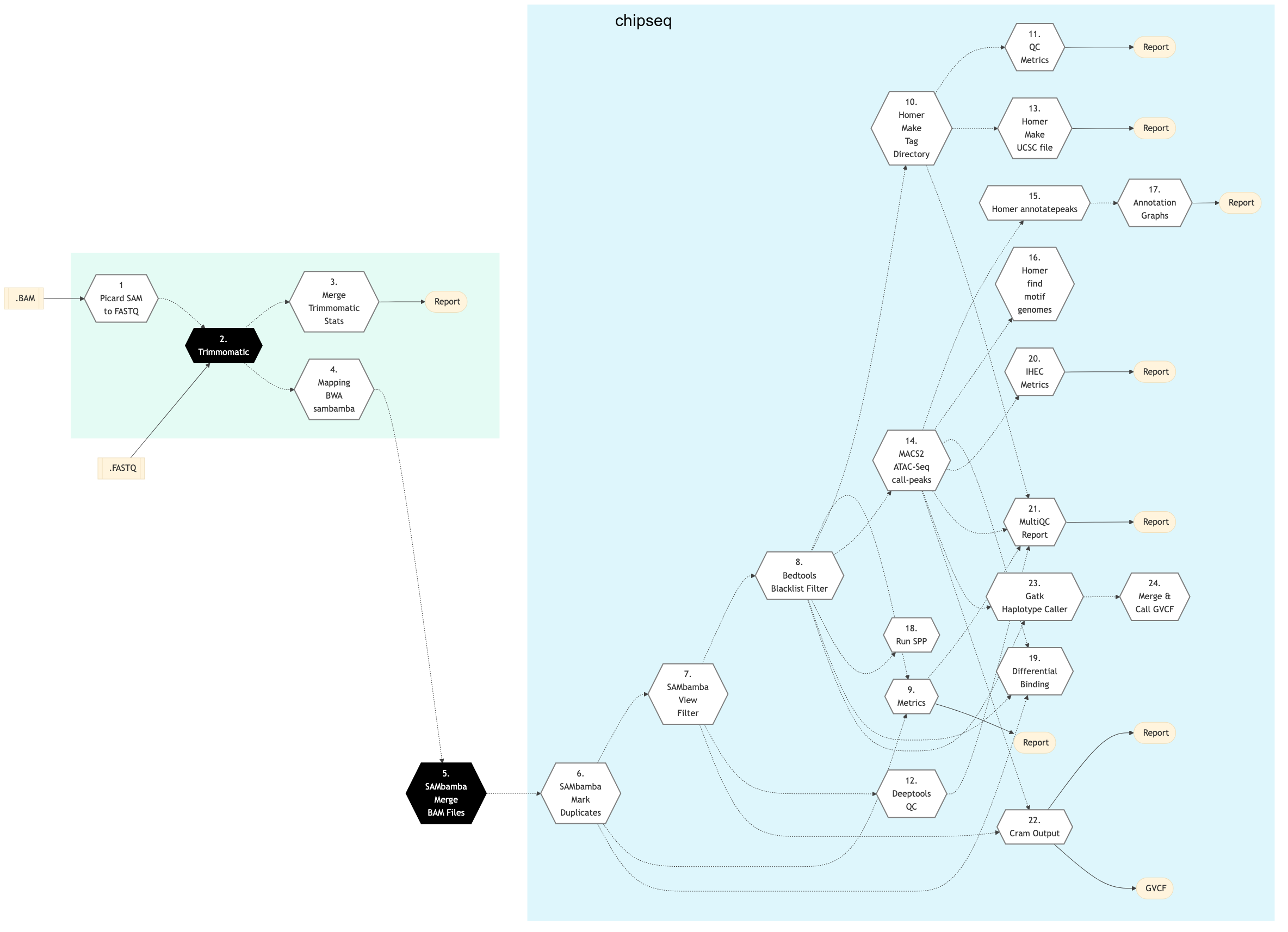
Figure: Schema of ChIP Sequencing protocol

ATACSeq
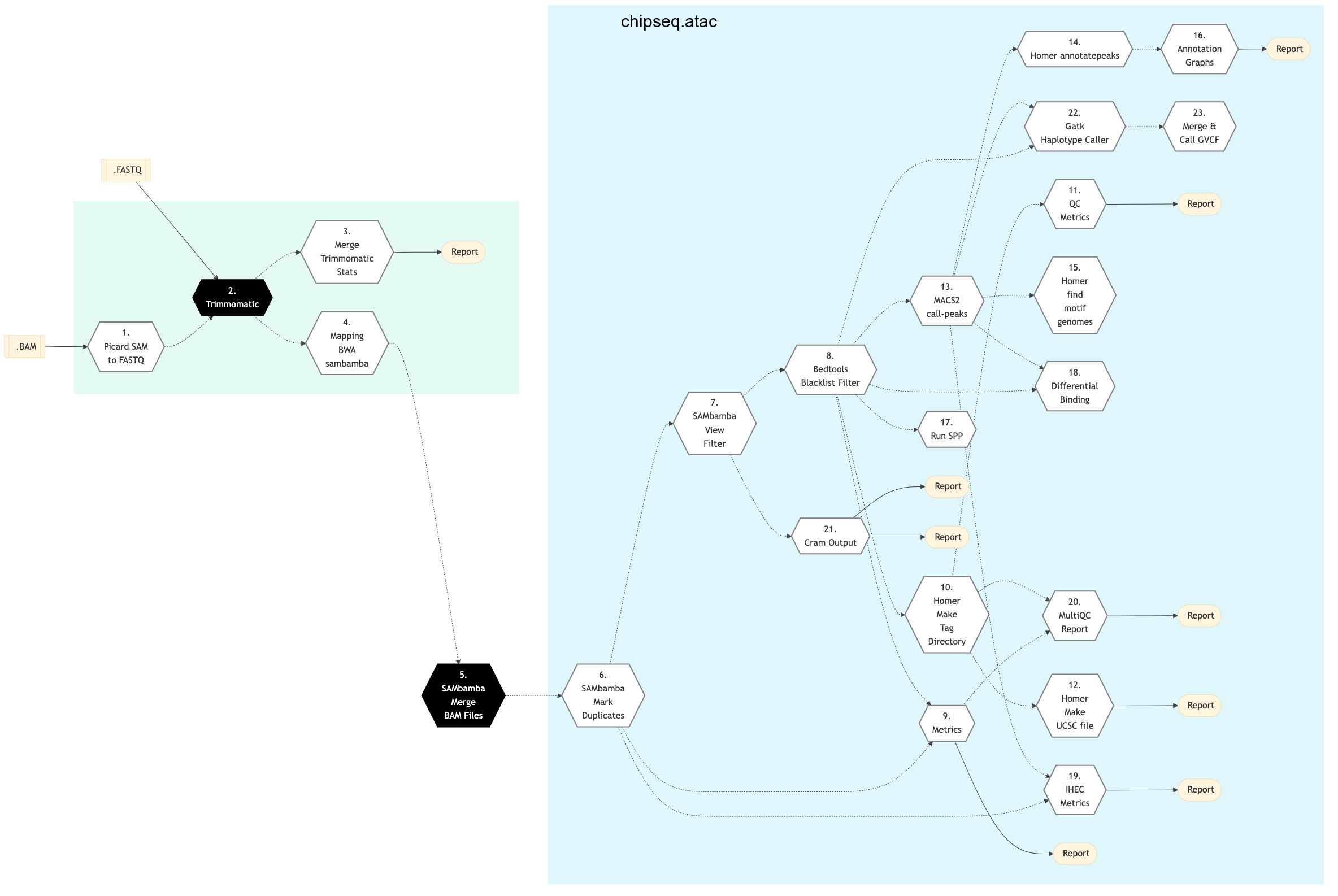
Figure: Schema of ChIP Sequencing -t atacseq protocol
ChIP-Seq
ATAC-Seq
homer_annotate_peaks|
Picard Sam to Fastq
If FASTQ files are not already specified in the Readset file, then this step converts SAM/BAM files from the input Readset into FASTQ format. Otherwise, it does nothing.
Trimmomatic
Raw reads quality trimming and removing of Illumina adapters is performed using Trimmomatic Process. If an adapter FASTA file is specified in the config file (section ‘trimmomatic’, param ‘adapter_fasta’), it is used first. Else, ‘Adapter1’ and ‘Adapter2’ columns from the readset file are used to create an adapter FASTA file, given then to Trimmomatic. For PAIRED_END readsets, readset adapters are reversed-complemented and swapped, to match Trimmomatic Palindrome strategy. For SINGLE_END readsets, only Adapter1 is used and left unchanged.
If available, trimmomatic step in Hi-C analysis takes FASTQ files from the readset file as input. Otherwise, it uses the FASTQ output file generated from the previous Picard Sam to Fastq step conversion of the BAM files.
Merge Trimmomatic Stats
The trim statistics per Readset file are merged at this step.
Mapping BWA Mem Sambamba
This step takes as input files trimmed FASTQ files, if available. Otherwise it takes FASTQ files from the readset. If readset is not supplied then it uses FASTQ output files from the previous Picard Sam to Fastq conversion of BAM files.
SAMbamba Merge BAM
BAM readset files are merged into one file per sample. Merge is done using Sambamba.
If available, the aligned and sorted BAM output files from previous Mapping BWA Mem Sambamba step are used as input. Otherwise, BAM files from the readset file is used as input.
SAMbamba Mark Duplicates
Mark duplicates. Aligned reads per sample are duplicates if they have the same 5’ alignment positions (for both mates in the case of paired-end reads). All but the best pair (based on alignment score) will be marked as a duplicate in the BAM file. Marking duplicates is done using SAMbamba.
SAMbamba View Filter
Filter unique reads by mapping quality using SAMbamba.
Metrics
The number of raw/filtered and aligned reads per sample are computed at this stage.
Homer Make Tag Directory
The Homer Tag directories, used to check for quality metrics, are computed at this step.
QC Metrics
Sequencing quality metrics as tag count, tag auto-correlation, sequence bias and GC bias are generated.
Deeptools QC
Fingerplot quality control answers the question “Did my ChIP work?” for ChIP-seq sample analysis. The tool processes indexed BAM files, creating a profile of cumulative read coverage. Reads in a specified window (bin) are counted, sorted, and plotted as a cumulative sum.
The Correlation Matrix tool analyzes and visualizes sample correlations using multiBamSummary or multiBigwigSummary output. It supports Pearson or Spearman methods to calculate correlation coefficients.
Homer Make UCSC files
Wiggle Track Format files are generated from the aligned reads using Homer. The resulting files can be loaded in browsers like IGV or UCSC.
MACS2 call peak
Peaks are called using the MACS2 software. Different calling strategies are used for narrow and broad peaks. The mfold parameter used in the model building step is estimated from a peak enrichment diagnosis run. The estimated mfold lower bound is 10 and the estimated upper bound can vary between 15 and 100.
The default mfold parameter of MACS2 is [10,30].
MACS2 ATAC-seq call peak
Assay for Transposon Accessible Chromatin (ATAC-seq) analysis enables measurement of chromatin structure modifications (nucleosome free regions) on gene regulation. This step involves calling peaks using the MACS2 software. Different calling strategies are used for narrow and broad peaks. The mfold parameter used in the model building step is estimated from a peak enrichment diagnosis run. The estimated mfold lower bound is 10 and the estimated upper bound can vary between 15 and 100.
The default mfold parameter of MACS2 is [10,30].
Homer annotate peaks
The peaks called previously are annotated with HOMER tool using RefSeq annotations for the reference genome. Gene ontology and genome ontology analysis are also performed at this stage.
Homer find motifs genome
In this step, De novo and known motif analysis per design are performed using HOMER.
Annotation Graphs
This step focuses on peak location statistics. The following peak location statistics are generated per design: proportions of the genomic locations of the peaks. The locations are: Gene (exon or intron), Proximal ([0;2] kb upstream of a transcription start site), Distal ([2;10] kb upstream of a transcription start site), 5d ([10;100] kb upstream of a transcription start site), Gene desert (>= 100 kb upstream or downstream of a transcription start site), Other (anything not included in the above categories); The distribution of peaks found within exons and introns; The distribution of peak distance relative to the transcription start sites (TSS); the Location of peaks per design.
Run SPP
This step runs spp to estimate NSC and RSC ENCODE metrics. For more information - see quality enrichment of ChIP sequence data, phantompeakqualtools.
Differential Binding
Differential Binding step is meant for processing DNA data enriched for genomic loci, including ChIP- seq data enriched for sites where specific protein binding occurs, or histone marks are enriched. It uses DiffBind package that helps in identifying sites that are differentially bound between sample groups.
GenPipes Chipseq pipeline performs differential binding based on the provided treatments and controls as per the particular comparison specified in the design file. The differential analysis results are generated separately for each specified comparison in the Design File, with correctly specified treatments (2) and controls (1) samples.
Samples with ‘0’ (zero) are ignored during the comparison. For details regarding how to specify sample group membership in the design file, refer to Design File Format details.
For comparison, at least two samples for each group must be specified. If two samples per group are not specified, the differential binding step will be skipped during the pipeline run.
Warning
Incorrect Design File Format
If the specified design file does not follow the specified Design File Format for ChIPseq pipeline, the differential binding step will be skipped during the pipeline run.
The output of differential analysis containing differentially bound peaks are saved as a TSV. In addition, for each comparison done using DiffBind, an html report is also generated for QC differential analysis.
Note
Limitation of Differential Binding
Differential Binding analysis currently supports pair-wise (two groups) comparisons only. If you have a more complex experimental design, you may manually conduct the analysis.
The Chip Sequencing protocol expects an input for the differential binding step. If pipeline users want to run this protocol without an input, they should skip the Differential Binding step and run it themselves locally.
IHEC Metrics
This step generates IHEC’s standard metrics.
MultiQC Report
A quality control report for all samples is generated. For more detailed information see MultiQC documentation.
Bedtools Blacklist Filter
Remove reads in blacklist regions from BAM with Bedtools intersect, if blacklist file is supplied, otherwise, do nothing.
GATK Haplotype Caller
Use GATK Haplotype caller for SNPs and small indels.
Merge & Call Individual GVCF
Merges the GVCFs of haplotype caller and also generates a per sample VCF containing genotypes.
CRAM Output
Generate long term storage version of the final alignment files in CRAM format. Using this function will include the original final BAM file into the removable file list.
Chromatin Immunoprecipitation (ChIP) sequencing technique is used for mapping DNA-protein interactions. It is a powerful method for identifying genome-wide DNA binding sites for transcription factors and other proteins.
The ChIP-Seq workflow is based on the ENCODE Project workflow. The pipeline starts by trimming adapters and low quality bases and mapping the reads (single end or paired end ) to a reference genome using Burrows-Wheeler Aligner (BWA). Reads are filtered by mapping quality and duplicate reads are marked. It creates tag directories using Homer routines. Peaks are called using Model based Analysis for Chip Sequencing (MACS2) and annotated using Homer. Binding motifs are also identified using Homer. Metrics are calculated based on IHEC requirements.
The ChIP-Seq pipeline can also be used for assay for transposase-accessible chromatin using sequencing ATAC-Seq samples. Use ‘ATAC’ protocol option to run the pipeline using ATAC-Seq.
See Schema tab for the pipeline workflow. Check the README.md file for implementation details.
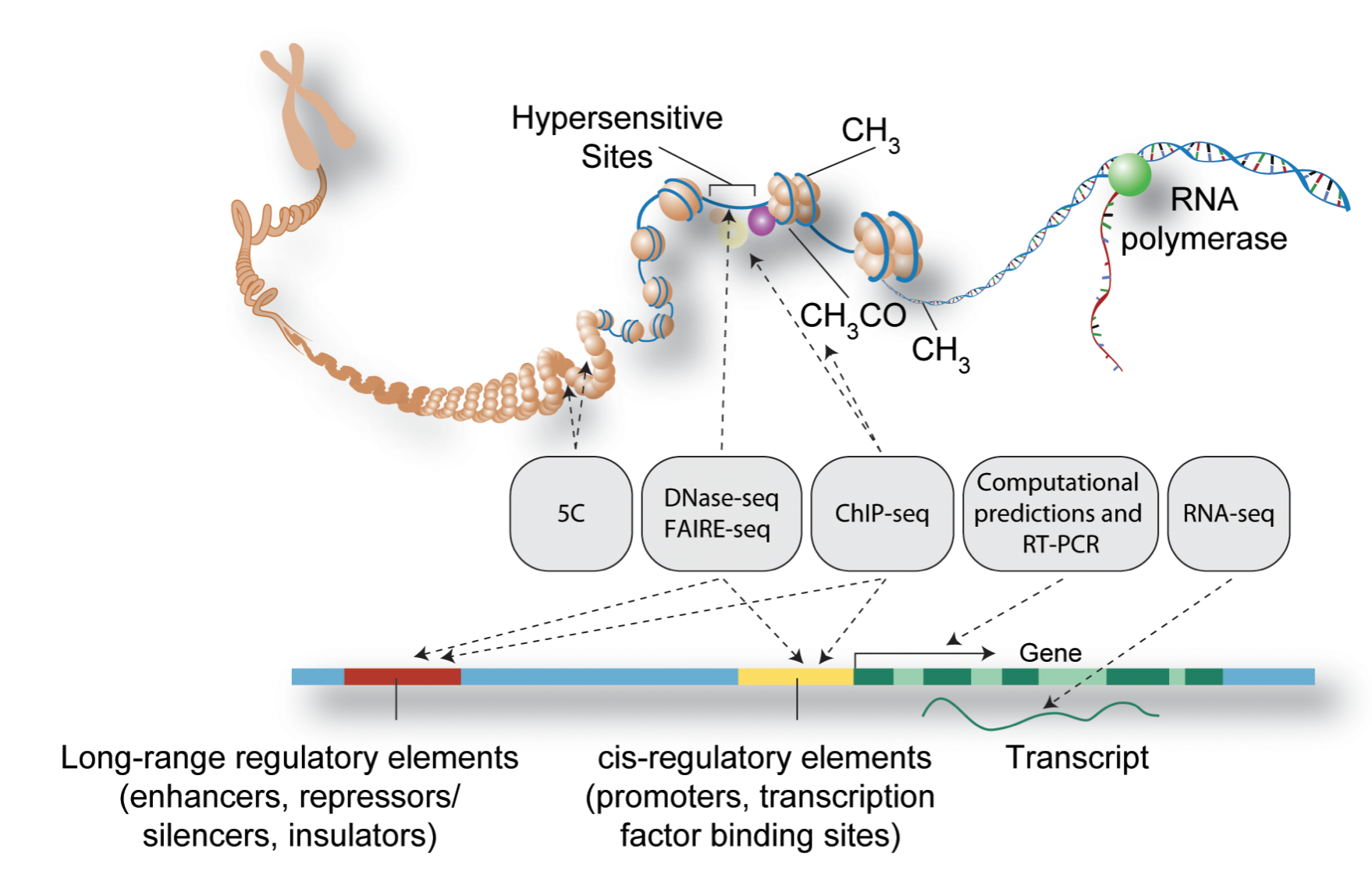
Figure: Schematic representation of major methods used to detect functional elements in DNA (Source PLOS)
References
Input requirements
The Chip Sequencing protocol expects an input for the Differential Binding step. If pipeline users want to run this protocol without an input, they should skip the differential binding step and run it themselves locally.
Chip Sequencing Readset File
Please make sure you use the special ChIPSeq Pipeline Readset file format and not the general readset file format.
Chip Sequencing Design File Format
Note
ChIPSeq Pipeline Design File Format
The ChIPSeq Pipeline has two protocols: atac-seq and chip-seq. Each of these protocols requires a specific design file.
ChIPseq Protocol Format
Sample        MarkName        EW22_EW3_vs_EW7_TC71
EW22          H3K27ac         1
EW3           H3K27ac         1
EW7           H3K27ac         2
TC71          H3K27ac         2
ATACseq Protocol Format
Important
Note that the MarkName value for ATACseq protocol should be atac unlike the ChIPseq protocol.
Sample        MarkName        EW22_EW3_vs_EW7_TC71
EW22          atac            1
EW3           atac            1
EW7           atac            2
TC71          atac            2
where, the numbers specify the sample group membership for this contrast:
'0' or '': the sample does not belong to any group;
'1': the sample belongs to the control group;
'2': the sample belongs to the treatment test case group.
The design file only accepts 1 for control, 2 for treatment and 0 for other samples that do not need to compare.
Warning
Incorrect Design File Format
Please note that the first and second column in the design file must be sample name and histone mark/binding protein respectively.
If the user specifies any value other than the permitted ones above in the design file, the pipeline will fail.