CoV Sequencing Pipeline
Version 6.1.0
Command
user@machine:~$ genpipes covseq [options] [--genpipes_file GENPIPES_FILE.sh]
bash GENPIPES_FILE.sh
Options
-d DESIGN, --design DESIGN

                              design file
-r READSETS, --readsets READSETS

                      readset file
-h show this help message and exit
--help show detailed description of pipeline and steps
-c CONFIG [CONFIG ...],
--config CONFIG [CONFIG ...]

                        config INI-style list of files; config parameters
                        are overwritten based on files order
-s STEPS, --steps STEPS step range e.g. '1-5', '3,6,7', '2,4-8'
-o OUTPUT_DIR, --output-dir OUTPUT_DIR

                        output directory (default: current)
-j {pbs,batch,daemon,slurm},
--job-scheduler {pbs,batch,daemon,slurm}

                        job scheduler type (default: slurm)
-f, --force               force creation of jobs even if up to date (default:
                          false)

                          Take the mem input in the ini file and force to have a
                          minimum of mem_per_cpu by correcting the number of cpu
                          (default: None)
--force_mem_per_cpu       FORCE_MEM_PER_CPU

                          Take the mem input in the ini file and force to have a
                          minimum of mem_per_cpu by correcting the number of cpu
                          (default: None)
--json-pt                 create JSON file for project_tracking database
                          ingestion (default: false i.e. JSON file will NOT be
                          created)
- -report                   create 'pandoc' command to merge all job markdown
                            report files in the given step range into HTML, if
                            they exist; if --report is set, --job-scheduler,
                            --force, --clean options and job up-to-date status
                            are ignored (default: false)
--clean                   create 'rm' commands for all job removable files in
                          the given step range, if they exist; if --clean is
                          set, --job-scheduler, --force options and job up-to-
                          date status are ignored (default: false)

                          Note: Do not use -g option with --clean, use '>' to redirect
                          the output of the --clean command option
-l {debug,info,warning,error,critical},
--log {debug,info,warning,error,critical}

                        log level (default: info)
--sanity-check            run the pipeline in `sanity check mode` to verify
                          all the input files needed for the pipeline to run
                          are available on the system (default: false)
--container {wrapper, singularity} <IMAGE PATH>

                        run pipeline inside a container providing a container
                        image path or accessible singularity hub path
--wrap [WRAP]             path to the GenPipes cvmfs wrapper script (default:
                          genpipes/ressources/container/bin/container_wrapper.sh,
                          a convenience option for using GenPipes in a container)
-v, --version show the version information and exit
-g GENPIPES_FILE, --genpipes_file GENPIPES_FILE

                          Commands for running the pipeline are output to this
                          file pathname. The data specified to pipeline command
                          line is processed and pipeline run commands are
                          stored in GENPIPES_FILE, if this option is specified
                          . Otherwise, the output will be redirected to stdout
                          . This file can be used to actually "run the
                          GenPipes Pipeline"
Important
Do not use -g option with -clean.
Use ‘>’ to redirect the output of the genpipes command to a file when using -clean option.
Example
user@machine:~$ genpipes covseq -c $GENPIPES_INIS/covseq/covseq.base.ini \
                                    $GENPIPES_INIS/common_ini/rorqual.ini \
                                    $GENPIPES_INIS/covseq/ARTIC_v4.1.ini \
                                -r readset.covseq.txt \
                                -g covseqCommands_mugqic.sh

user@machine:~$ bash covseqCommands_mugqic.sh
Tip
Depending upon the cluster where you are executing the pipeline, substitute the file name rorqual.ini in the command with the appropriate <DRAC server cluster name>.ini file located in the $GENPIPES_INIS/common_ini folder.
For e.g., rorqual.ini, fir.ini, or narval.ini.
Caution
It is recommended that you use the -g GENPIPES_CMD.sh option instead of redirecting the output of the pipeline command to a file via > GENPIPES_CMD.sh.
user@machine:~$ genpipes [pipeline] [options] -g genpipes_cmd.sh

user@machine:~$ bash genpipes_cmd.sh
user@machine:~$ genpipes [pipeline] [options] > genpipes_cmd.sh

user@machine:~$ bash genpies_cmd.sh
The > scriptfile method is supported but will be deprecated in a future GenPipes release.
CovSeq
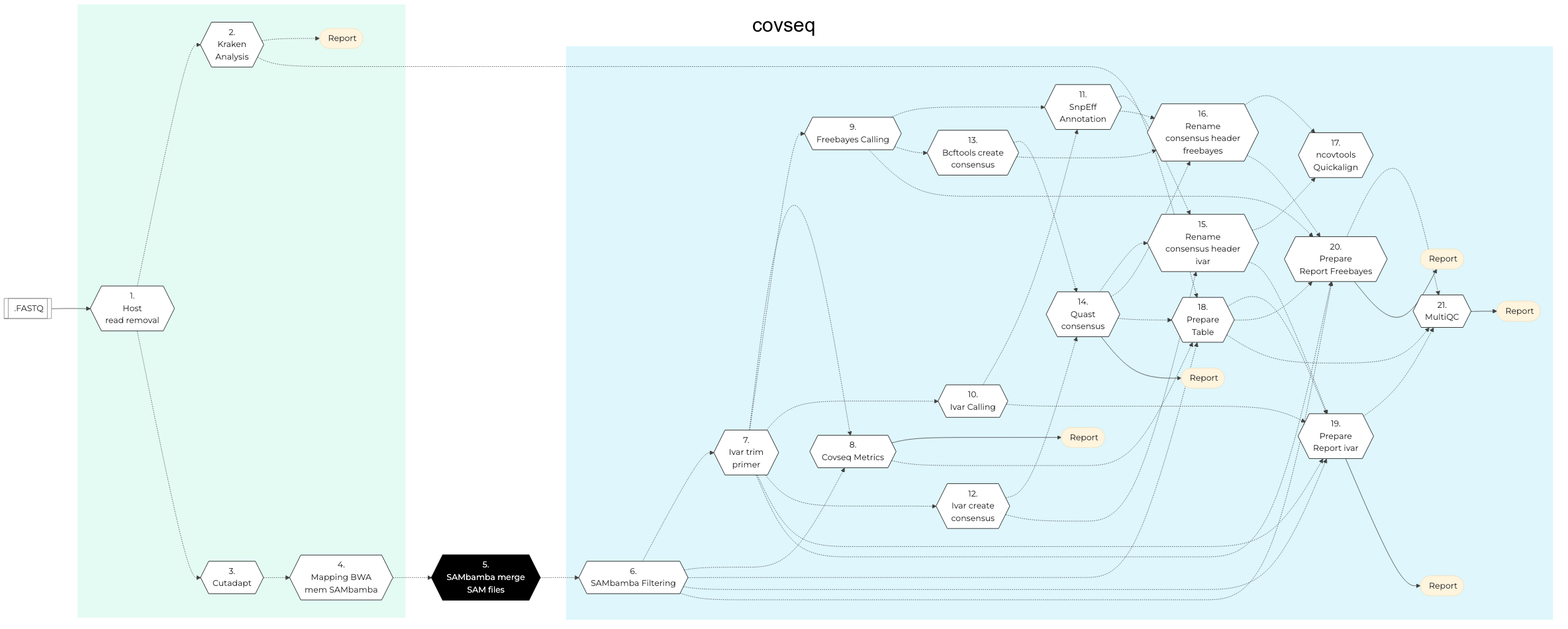
Figure: Schema of CoVSeq Sequencing protocol

SARS-CoV-2
Host Reads Removal
In this step, the filtered reads are aligned to a reference genome. The alignment is done per sequencing readset using the BWA Software and BWA-Mem Algorithm. BWA output BAM files are then sorted by coordinate using Sambamba.
Input files for this step include:
Trimmed FASTQ files, if available
If no FASTQ files then FASTQ files from supplied readset is used.
If no readset is supplied then FASTQ output from Picard SAM to FASTQ conversion of BAM files is used.
Kraken Analysis
Kraken is an ultra fast and highly accurate mechanism for assigning taxonomic labels to metagenomic DNA sequences. It achieves high sensitivity and speed by utilizing exact alignments of k-mers and a novel classification algorithm. This step performs Kraken analysis using output of the Sambamba processing in previous step.
Cutadapt
Cutadapt processing cleans data by finding and removing adapter sequences, primers, poly-A tails and other types of unwanted sequence from high throughput sequencing reads obtained after Kraken analysis. In this step, quality trimming of raw reads and removing of adapters is performed by giving ‘Adapter1’ and ‘Adapter2’ columns from the readset file to Cutadapt. For PAIRED_END readsets, both adapters are used. For SINGLE_END readsets, only Adapter1 is used and left unchanged.
To trim the front of the read, use adapter_5p_fwd and adapter_5p_rev (For PAIRED_END only) in cutadapt section of the .ini file.
This step takes as input files:
FASTQ files from the readset file, if available.
Otherwise, FASTQ output files from previous Picard SAM to FASQ conversion of BAM files is used.
Mapping BWA Mem Sambamba
This step takes as input files trimmed FASTQ files, if available. Otherwise it takes FASTQ files from the readset. If readset is not supplied then it uses FASTQ output files from the previous Picard SAM to FASTQ conversion of BAM files.
Here, the filtered reads are aligned to a reference genome. The alignment is done per sequencing readset. BWA Software is used for alignment with BWA-Mem Algorithm. BWA output BAM files are then sorted by coordinate using Sambamba.
Sambamba Merge SAM Files
This step uses Sambamba-Merge Tool to merge several BAM files into one. SAM headers are merged automatically similar to how it is done in Picard merging tool.
Sambamba Filtering
In this step, raw BAM files are filtered using Sambamba and and `awk` command is run to filter by insert size.
iVar Trim Primers
iVar uses primer positions supplied in a BED file to soft clip primer sequences from an aligned and sorted BAM file. Following this, the reads are trimmed based on a quality threshold(Default: 20). To do the quality trimming, iVar uses a sliding window approach(Default: 4). The windows slides from the 5’ end to the 3’ end and if at any point the average base quality in the window falls below the threshold, the remaining read is soft clipped.
In this step, primer sequences are removed from individual BAM files using iVar.
CoVSeq Metrics
In this step, multiple metrics are computed from sequencing:
DNA Sample Qualimap to facilitate quality control of alignment sequencing
Sambamba-flagstat for obtaining flag statistics from BAM file
BED Tools GenomeCov is used for computing histograms(default), per-base reports and BEDGRAPH summaries of feature coverage of aligned sequences for a given genome.
Picard HS Metrics are picked from SAM/BAM files. Only those metrics are collected that are specific for sequence datasets generated through hybrid-selection. Hybrid-selection (HS) is the most commonly used technique to capture exon-specific sequences for targeted sequencing experiments such as exome sequencing.
Freebayes Calling
Freebayes is a haplotype-based variant detector designed to find small polymorphisms, specifically SNPs (single-nucleotide polymorphisms), indels (insertions and deletions), MNPs (multi-nucleotide polymorphisms), and complex events (composite insertion and substitution events) smaller than the length of a short-read sequencing alignment.
This method avoids one of the core problems with alignment-based variant detection— that identical sequences may have multiple possible alignments. See Freebayes details here.
iVar Calling
In this step, iVar is used for creating a trimmed BAM file after trimming aligned reads in the input BAM file using primer positions specified in the BED input file. Besides the Freebayes Calling tool, ivar calling is also used in covseq pipeline as part of the latest release.
SNPEff Annotate
This step uses SNPEff to annotate the data.
iVar Create Consensus
In this step, iVar is used to create consensus. Also, it removes primer sequences to individual BAM files using fgbio.
BCFTools Create Consensus
BCFtools consensus is created in this step. BCFtools is a set of utilities that manipulate variant calls in the Variant Call Format (VCF) and its binary counterpart BCF
QUAST Consensus Metrics
In this step, QUAST is used to compare and evaluate assemblies to rule out misassemblies.
Rename Consensus Header ivar
Consensus sequence is the calculated order of most frequent residues found at each position in a sequence alignment. This information is important when considering sequence-dependent enzymes such as RNA Polymerase which is important for SAR-CoV-2 studies. In this step, header sequence can be modified in various ways as specified in rename type parameter: Multipart header, Replace word, Replace interval, and Add prefix/suffix.
Rename Consensus Header freebayes
Two variant calling tools are used in covseq pipeline - ivar and freebayes. In this step, the consensus header rename for freebayes is done.
ncovtools Quickalign
Uses quickalign to provides summary statistics, which can be used to determine the sequencing quality and evolutionary novelty of input genomes (e.g. number of new mutations and indels).
It uses ivar consensus as well as freebayes consensus to arrive at the alignment decisions.
Prepare Table
Gathers all analysis data for quast, kraken and other metrics and module details.
Prepare Report ivar
Prepare ivar analysis report.
Prepare Report Freebayes
Prepare Freebayes analysis report.
MultiQC Report
A quality control report for all samples is generated. For more detailed information see MultiQC documentation.
CoVSeQ pipeline is designed as part of the partnership for Québec SARS-CoV-2 sequencing. It is funded by the CanCOGeN initiative through Genome Canada and from the Ministere de la santé et des services sociaux du Québec. For more details, see CoVSeQ website.
The COVID-19 pandemic required surveillance of the SARS-CoV-2 variants and fast spreading mutants through rapid and near real-time sequencing of the viral genome. This is critical for effective health policy decision making. Gene sequencing pipelines require to be focused on specific characteristics of the COVID genome such as spike protein. To that effect, SARS-CoV-2 sequencing has been standardized through initiatives such as the Advancing Real-Time Infection Control Network (ARTIC) international initiative in which Illumina or Oxford Nanopore sequencing is carried out prior to whole viral genome amplification by tiling PCR or metagenomic approaches.
SARS-CoV-2 whole genome sequencing data can help researchers in the following ways:
characterize viral variants that occur within a given host
understand variant fixation in a given population
understand how the virus changes over time.
GenPipes offers CoVSeQ Pipeline, a bioinformatics workflow that incorporates Illumina and ONT sequence. This pipeline is intended to address both short as well as long reads and input data obtained from Illumina as well as ONT Nanopore instruments.
CoVSeQ pipeline helps in the genomic epidemiology of SARS-CoV-2 that output sequence alignment analysis and/or variants in various formats. It uses Kraken2, FreeBayes, SnpEff for genomic processing and bcftools, QUAST for consensus. The latest version of the pipeline uses ncov-tools v1.8 for alignment and quality control. SAM Tools are used for sorting and indexing BAM files. It performs variant calling on every sorted BAM file, obtaining major frequency viral variants per genome in VCF format using the Freebayes variant calling program, as frequency-based pooled caller. Merged variants are annotated using SnpEff.
It can be used for SARS-CoV-2 whole genome sequencing as per ARTIC protocol V4 or V4.1 by specifying appropriate .ini file as described below in usage and example sections.
See Schema tab for the pipeline workflow. Refer to CoVSeq Pipeline implementation README.md for details.
References
ARTIC v4 vs v4.1 selection
This CoVSeQ pipeline uses ARTIC v4 amplicon scheme as a default. If ARTIC v4.1 is required, use the appropriate .ini file. For all other amplicon schemes, add the appropriate primer and amplicon BED files and use a custom .ini for processing.