Nanopore CoVSeQ Pipeline
Version 6.1.0
Command
user@machine:~$ genpipes nanopore_covseq [options] [--genpipes_file GENPIPES_FILE.sh]
user@machine:~$ bash GENPIPES_FILE.sh
Options
-t {default, basecalling},
--type {default, basecalling}

                          Nanopore Covseq analysis type (default=default)
-r READSETS, --readsets READSETS

                      readset file
-h show this help message and exit
--help show detailed description of pipeline and steps
-c CONFIG [CONFIG ...],
--config CONFIG [CONFIG ...]

                        config INI-style list of files; config parameters
                        are overwritten based on files order
-s STEPS, --steps STEPS step range e.g. '1-5', '3,6,7', '2,4-8'
-o OUTPUT_DIR, --output-dir OUTPUT_DIR

                        output directory (default: current)
-j {pbs,batch,daemon,slurm},
--job-scheduler {pbs,batch,daemon,slurm}

                        job scheduler type (default: slurm)
-f, --force               force creation of jobs even if up to date (default:
                          false)

                          Take the mem input in the ini file and force to have a
                          minimum of mem_per_cpu by correcting the number of cpu
                          (default: None)
--force_mem_per_cpu       FORCE_MEM_PER_CPU

                          Take the mem input in the ini file and force to have a
                          minimum of mem_per_cpu by correcting the number of cpu
                          (default: None)
--json-pt                 create JSON file for project_tracking database
                          ingestion (default: false i.e. JSON file will NOT be
                          created)
- -report                   create 'pandoc' command to merge all job markdown
                            report files in the given step range into HTML, if
                            they exist; if --report is set, --job-scheduler,
                            --force, --clean options and job up-to-date status
                            are ignored (default: false)
--clean                   create 'rm' commands for all job removable files in
                          the given step range, if they exist; if --clean is
                          set, --job-scheduler, --force options and job up-to-
                          date status are ignored (default: false)

                          Note: Do not use -g option with --clean, use '>' to redirect
                          the output of the --clean command option
-l {debug,info,warning,error,critical},
--log {debug,info,warning,error,critical}

                        log level (default: info)
--sanity-check            run the pipeline in `sanity check mode` to verify
                          all the input files needed for the pipeline to run
                          are available on the system (default: false)
--container {wrapper, singularity} <IMAGE PATH>

                        run pipeline inside a container providing a container
                        image path or accessible singularity hub path
--wrap [WRAP]             path to the GenPipes cvmfs wrapper script (default:
                          genpipes/ressources/container/bin/container_wrapper.sh,
                          a convenience option for using GenPipes in a container)
-v, --version show the version information and exit
-g GENPIPES_FILE, --genpipes_file GENPIPES_FILE

                          Commands for running the pipeline are output to this
                          file pathname. The data specified to pipeline command
                          line is processed and pipeline run commands are
                          stored in GENPIPES_FILE, if this option is specified
                          . Otherwise, the output will be redirected to stdout
                          . This file can be used to actually "run the
                          GenPipes Pipeline"
Important
Do not use -g option with -clean.
Use ‘>’ to redirect the output of the genpipes command to a file when using -clean option.
Example
user@machine:~$ genpipes nanopore_covseq -c $GENPIPES_INIS/nanopore/nanopore.base.ini \
                                            $GENPIPES_INIS/common_ini/rorqual.ini \
                                            $GENPIPES_INIS/nanopore_covseq/ARTIC_v4.1.ini \
                                         -r readset.default.nanopore_covseq.txt
                                         -g nanopore_covseq_cmd.sh

user@machine:~$ bash nanopore_covseq_cmd
Tip
Depending upon the cluster where you are executing the pipeline, substitute the file name rorqual.ini in the command with the appropriate <DRAC server cluster name>.ini file located in the $GENPIPES_INIS/common_ini folder.
For e.g., rorqual.ini, fir.ini, or narval.ini.
Nanopore Readset Format
Use the following readset file format for Nanopore, Nanopore CoV-Seq pipelines:
Sample: must contain letters A-Z, numbers 0-9, hyphens (-) or underscores (_) only; mandatory;
Readset: a unique readset name with the same allowed characters as above; mandatory;
Run: a unique ONT run name, usually has a structure similar to PAE0000_a1b2c3d;
Flowcell: code of the type of Flowcell used, for example: the code for PromethION Flow Cell (R9.4) is FLO-PRO002;
Library: code of the type of library preparation kit used, for example: the code for the Ligation Sequencing Kit is SQK-LSK109;
Summary: path to the sequencing_summary.txt file outputted by the ONT basecaller; mandatory;
FASTQ: mandatory, path to the fastq_pass directory, that is usually created by the basecaller
FAST5: path to the directory containing the raw fast5 files, before basecalling
Example:
Sample
Readset
Run
Flowcell
Library
Summary
FASTQ
FAST5
sampleA
readset1
PAE00001_abcd123
FLO-PRO002
SQK-LSK109
path/to/readset1_sequencing_summary.txt
path/to/readset1/fastq_pass
path/to/readset1/fast5_pass
sampleA
readset2
PAE00002_abcd456
FLO-PRO002
SQK-LSK109
path/to/readset2_sequencing_summary.txt
path/to/readset2/fastq_pass
path/to/readset2/fast5_pass
sampleA
readset3
PAE00003_abcd789
FLO-PRO002
SQK-LSK109
path/to/readset3_sequencing_summary.txt
path/to/readset3/fastq_pass
path/to/readset3/fast5_pass
sampleA
readset4
PAE00004_abcd246
FLO-PRO002
SQK-LSK109
path/to/readset4_sequencing_summary.txt
path/to/readset4/fastq_pass
path/to/readset4/fast5_pass
Caution
It is recommended that you use the -g GENPIPES_CMD.sh option instead of redirecting the output of the pipeline command to a file via > GENPIPES_CMD.sh.
user@machine:~$ genpipes [pipeline] [options] -g genpipes_cmd.sh

user@machine:~$ bash genpipes_cmd.sh
user@machine:~$ genpipes [pipeline] [options] > genpipes_cmd.sh

user@machine:~$ bash genpies_cmd.sh
The > scriptfile method is supported but will be deprecated in a future GenPipes release.
You can download the test dataset for this pipeline here.
Default
Figure below shows the schema of the Nanopore CoVSeQ ARTIC SARS-CoV2 sequencing protocol. You can also refer to the latest pipeline implementation
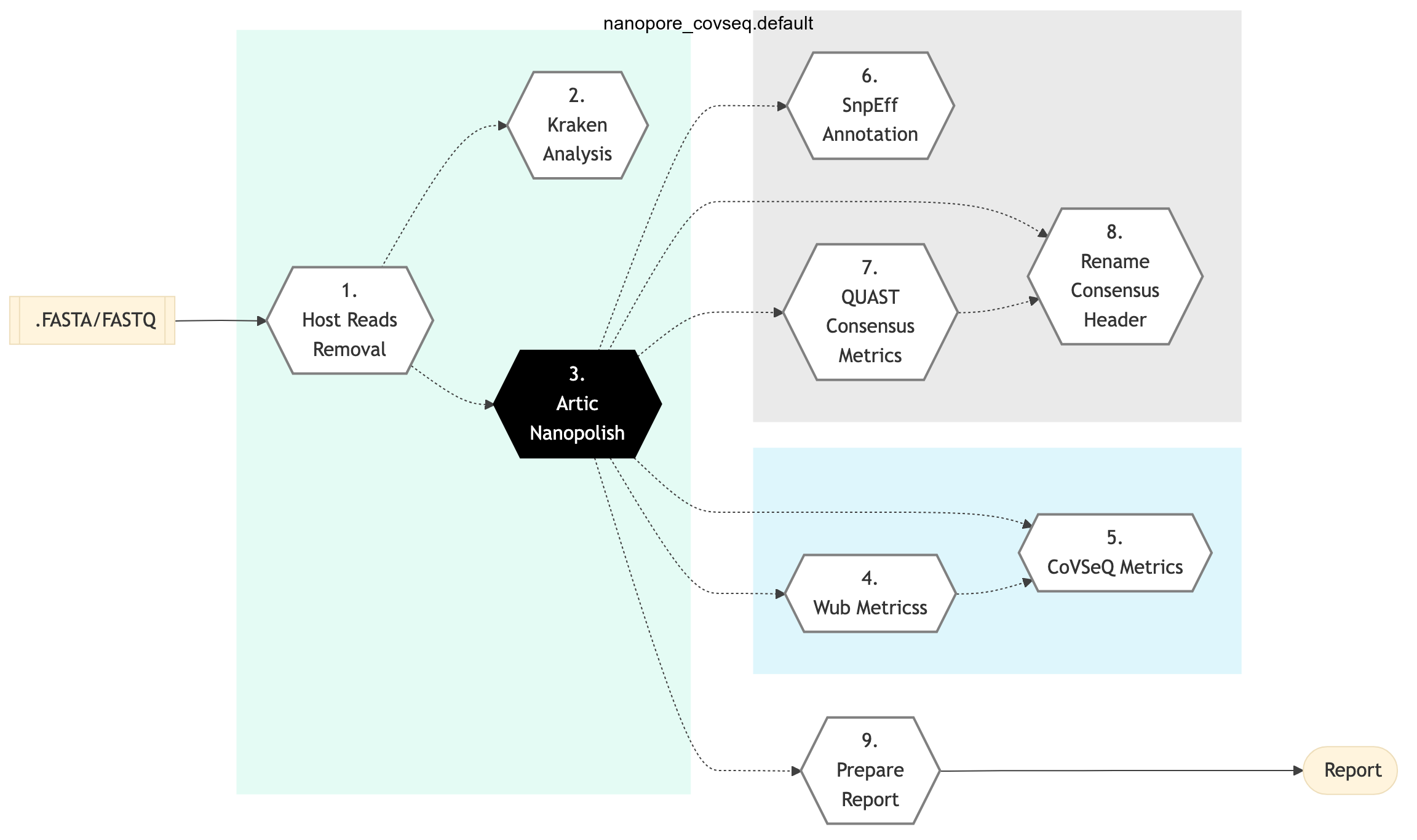
Figure: Schema of Nanopore CoVSeQ (Default) Sequencing protocol

Basecalling
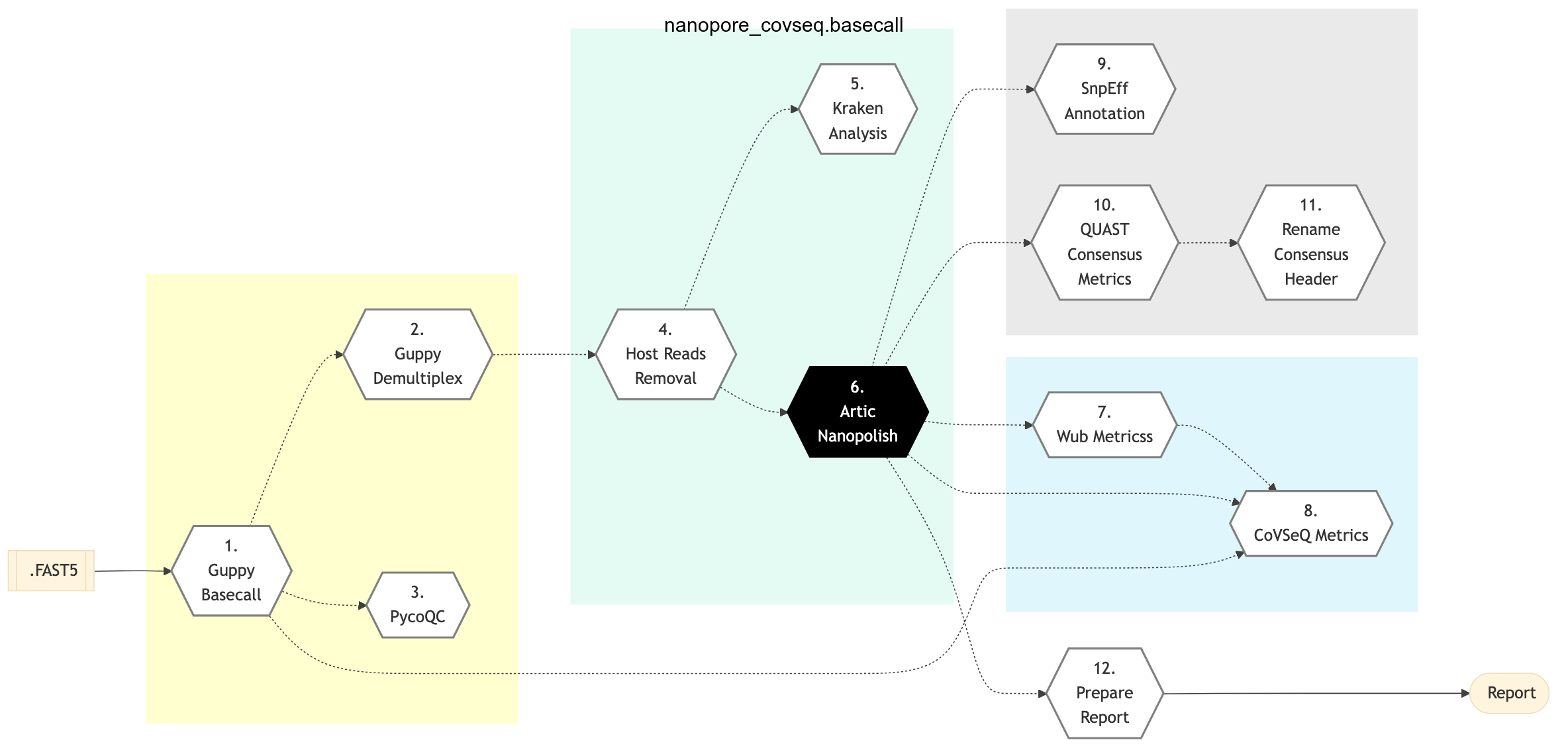
Figure: Schema of Nanopore CoVSeQ (Basecalling) Sequencing protocol
Default
Basecalling
Guppy Basecall
This step uses the Oxford Nanopore basecaller, Guppy to basecall raw FAST5 files and produce FASTQ files. Basecalling model dna_r9.4.1_450bps_hac.cfg is used by default.
Guppy Demultiplex
This step uses he Oxford Nanopore basecaller Guppy to demultiplex FASTQ files based on their barcode. Barcode arrangement barcode_arrs_nb96.cfg is used by default.
Note
In the Guppy Demultiplex call, the following parameter, `--require_barcodes_both_ends`, is set by default.
pycoQC
In this step, pycoQC Software is used produce an interactive quality report based on the summary file and alignment outputs. PycoQC relies on the sequencing_summary.txt file generated by Guppy. If needed, it can also generate a summary file from basecalled FAST5 files. PycoQC computes metrics and generates interactive QC plots for Oxford Nanopore technologies sequencing data.
Host Reads Removal
This step uses a mapping approach with a hybrid GRCh38 + SARS-CoV2 genome. The reads that map to the Human Genome are removed from the analysis. A “de-hosted” FASTQ is produced.
Kraken Analysis
Kraken is a taxonomic sequence classifier that assigns taxonomic labels to short DNA reads. It does this by examining the k-mers within a read and querying a database with those k-mers.
Additionally, Kraken2 is used to produce a report on the raw data, which can be used to detect additional host contamination.
ARTIC Nanopolish
The ARTIC Nanopolish pipeline is used to produce consensus sequences and VCFs. Since Nanopolish is used, this step requires both FAST5 and FASTQ files.
Wub Metrics
Wub Package is used to calculate alignment metrics in this pipeline step.
CoVSeQ Metrics
Using all previous metrics calculated so far, a table is produced with a summary of all metrics for each individual sample.
SnpEff Annotate
The VCF produced by ARTIC Nanopolish step is annotated using SnpEff.
Quast Consensus Metrics
Consensus metrics are calculated using the tool QUAST.
Rename Consensus Header
A final consensus sequence is produced, with the appropriate header and naming convention based on genome completeness.
Prepare Report
Using ncov-tools package and additional R scripts, final reports are produced for all samples in the run, including basic QC plots as well as a preliminary lineage assignment through ncov-tools package.
The Nanopore CoVSeQ pipeline is used to analyze long reads produced by the Oxford Nanopore Technologies (ONT) sequencers.
The SOP for Nanopore data is based on the ARTIC SARS-CoV2 protocol, Version 4 / 4.1 (V4.1), using nanopolish. This protocol is closely followed in GenPipes Nanopore sequencing pipeline with majority of changes related to technical adaptation of the protocol to be able to run in a High Performance Computing (HPC) environment. In such environments, Conda is not advisable.
Key steps in this pipeline include basecalling with Guppy, demultiplexing, read filtering and consensus sequencing. Basecalling with Guppy happens only if the `-t basecalling` option is selected.
If basecalling protocol option is selected through the -t command line option, the Nanopore CoVSeQ pipeline will do basecalling with Guppy (GPU) and demultiplexing. After basecalling, the pipeline performs de-hosting, for all the samples, followed by running the ARTIC-Nanopolish wrapper which performs alignment to the SARS-CoV2 reference (using minimap2), variant calling (using Nanopolish software). The Nanopolish software performs signal-level analysis of Oxford Nanopore sequencing data. After Nanopolish processing, the pipeline performs consensus generation through artic_mask and bcftools consensus steps. Lastly, custom scripts and ncov_tools are run to report on quality metrics for Nanopore CoVSeQ GenPipes Sequencing Pipeline.
Details of structure and contents of the Nanopore readset file are available here.
See See Schema tab for the pipeline workflow. For more details, refer to the README file file.
References
Phylogenetic Analysis of nCoV-2019 genome using publicly shared genome sequences with datasets from NCBI or GISAID.
Tiling Amplicon sequencing and downstream bioinformatics analysis
ARTIC v4 vs v4.1 selection
This CoVSeQ pipeline uses ARTIC v4 amplicon scheme as a default. If ARTIC v4.1 is required, use the appropriate .ini file. For all other amplicon schemes, add the appropriate primer and amplicon BED files and use a custom .ini for processing.