Deployment Options
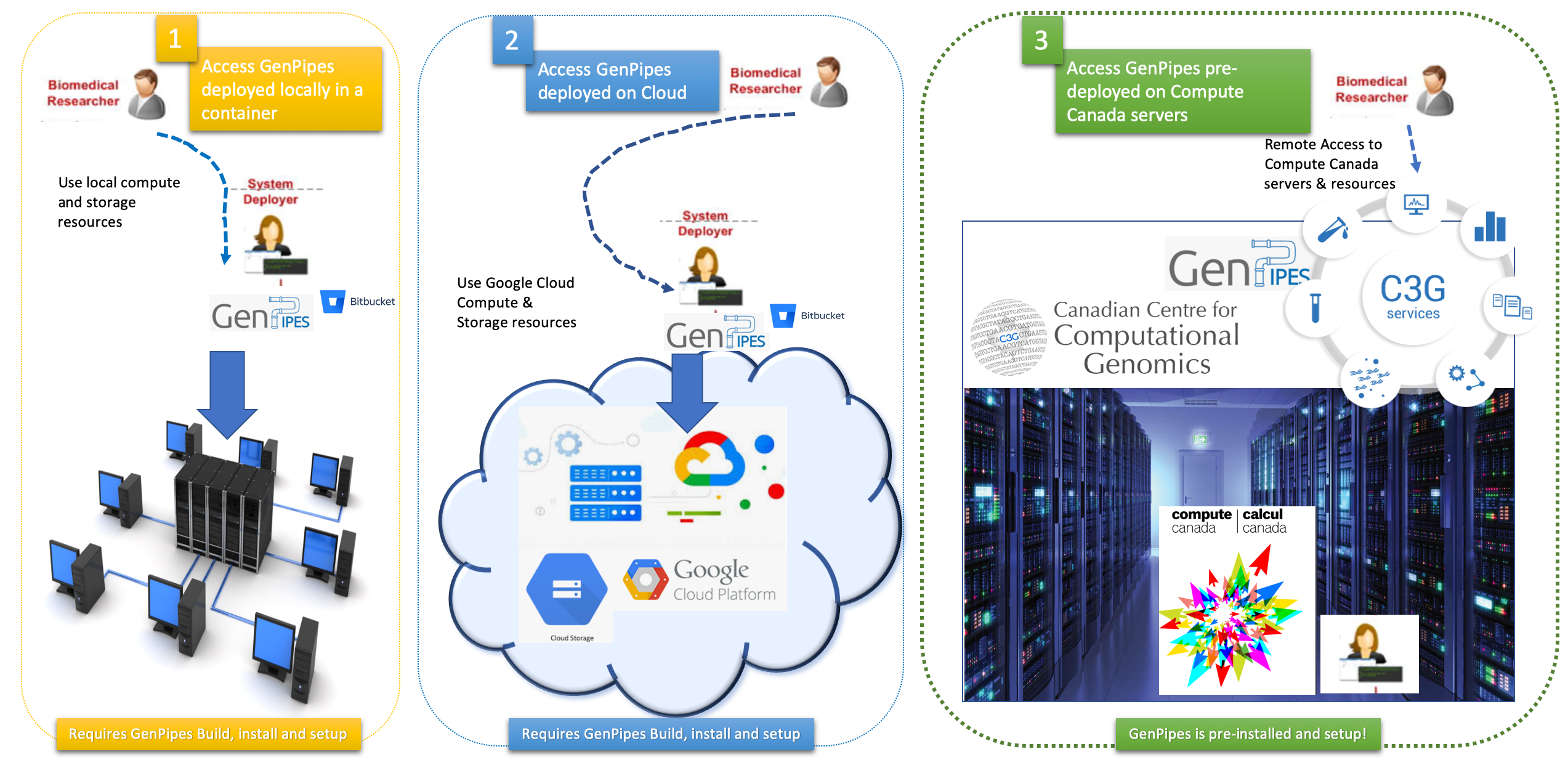
There are multiple ways to get started with genomic analysis using GenPipes. The figure below represents the three options available to bioinformatics researchers to access and use GenPipes.
Pre-deployed: Access GenPipes remotely deployed at the DRAC servers
Cloud: GenPipes deployment in the cloud - Google Cloud Platform (GCP)
Local deployment:
Bare metal or virtual server
GenPipes in a container
Do you need help choosing which deployment option to use?
Our latest tool, GenPipes Wizard, helps beginners dive right into genomic analysis using GenPipes. This intuitive wizard walks new users through picking the best deployment option, pipeline, and protocol, while automatically assembling the complete command for running GenPipes.
Accessing GenPipes
The infographic below represents various mechanisms that can be used to access GenPipes today.
GenPipes Source code
GenPipes source code is hosted in a GitHub repository. See GenPipes for instructions on downloading and setting up GenPipes.
1. Pre-deployed: GenPipes on DRAC Servers
Researchers that have access to the Digital Research Alliance of Canada (DRAC), formerly Compute Canada (CCDB), servers need not deploy GenPipes for genomic analysis. They can simply login and access Digital Research Alliance servers that have pre-installed stable release of GenPipes. For details see how to access GenPipes deployment on Digital Research Alliance Canada infrastructure. External users who do not have access to DRAC resources can apply for the same.
Through a partnership with the Digital Research Alliance Canada consortium, the pipelines and third-party tools have also been configured on 6 different Alliance HPC centers. This allows any Canadian researcher to use GenPipes along with the needed computing resources by simply applying to the consortium. To ensure consistency of pipeline versions and used dependencies (such as genome references and annotation files) and to avoid discrepancy between compute sites, pipeline set-up has been centralized to 1 location, which is then distributed on a real-time shared file system: the CERN (European Organization for Nuclear Research) Virtual Machine File System CVM FS.
2. Cloud: GenPipes on GCP
If you need to run large scale genomic analysis that requires resource scaling, GenPipes can be deployed and accessed from cloud. At present, Google Compute Platform (GCP) is supported. You may require assistance from System Administrator or your local cloud expert to install and deploy GenPipes in the cloud before you can access and run genomic analysis pipelines provided by GenPipes. For details refer to GenPipes installation guide section titled “How to deploy GenPipes in the cloud?”.
3. Local deployment
If you wish to deploy GenPipes locally using your own compute and storage infrastructure, you have two options. You could either deploy it on your local server / workstation or try the ‘GenPipes in a container’ option.
Local deployment option can be used for small scale genomic analyses using genome datasets available locally. The GenPipes in a container option is a self-contained image that offers GenPipes software, common reference genomes and all that is needed to run the pre-built analysis pipelines. Bioinformatics researchers who are not familiar with container technology may require assistance from System Administrators in deploying a local copy of GenPipes software.
Server Deployment
To deploy locally, use the latest GenPipes download or use the sources located at the GenPipes GitHub repository.
GenPipes can be installed from scratch on any Linux cluster supporting Python version 3.11.1 or higher by following the instructions in the README.md file.
Container Deployment
To use the container deployment use the docker image for GenPipes.
This docker image simplifies the setup process. It can be used on a various platforms, including cloud platforms. It allows system-wide installations, as well as local user installations. No special permissions are needed to access containerized GenPipes.
For more details see GenPipes in a Container guide.